Atlantis: Running Terraform on GitHub as Infra GitOps

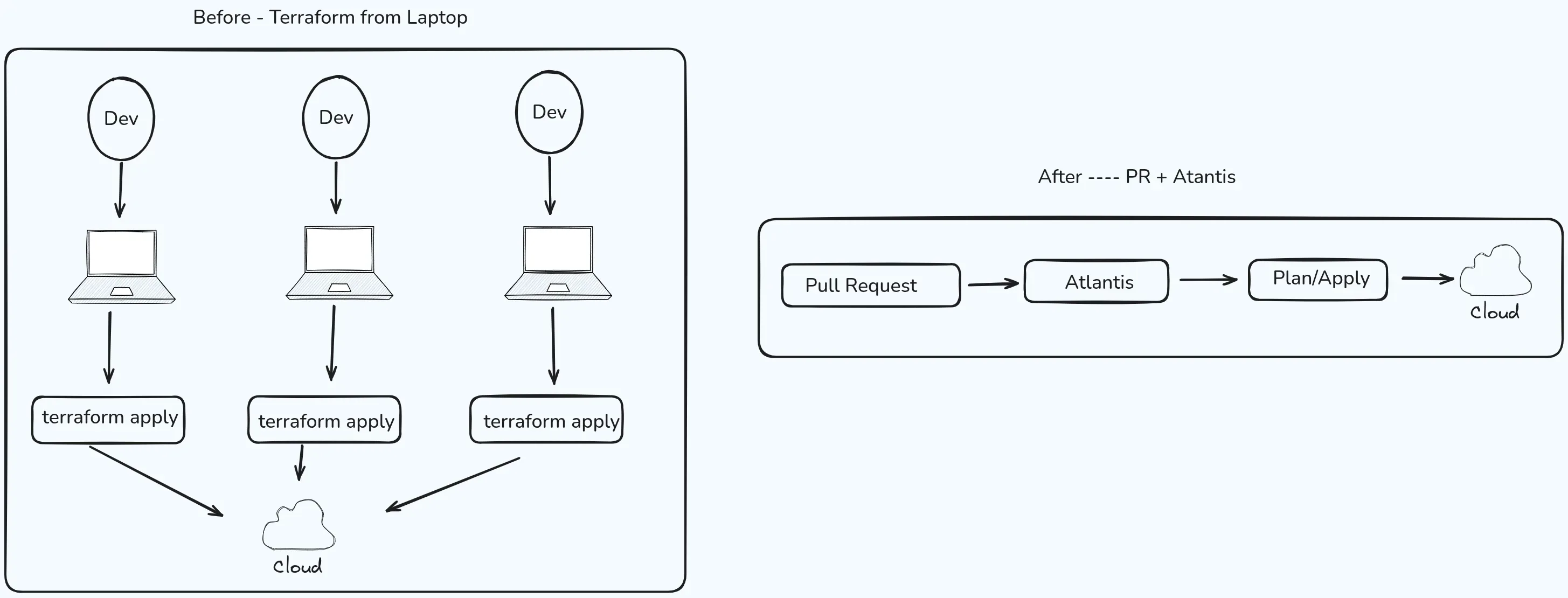
Five people, five laptops, one shared state file — and no shared front door. Atlantis turns "who applied what?" into a pull request anyone can read.
There were maybe four or five of us in the same company, happily running terraform plan and terraform apply from our laptops, convinced we owned every piece of the infrastructure. It felt fine until it didn’t: locks nobody could explain, modules nobody reviewed, and applies that never made it to Git. We did not see that this was what was blocking real platform engineering—the thing we had talked about for years. We still had dev teams ask DevOps for every new piece of infra, which is not what a self-serve platform looks like.
Atlantis didn’t fix our problems overnight, but it gave us a single front door: plans and applies were tied to pull requests, not to the specific person's having access to cloud.
When the entire infra lived on our laptops
For a while, “infrastructure as code” meant we had the repo cloned in our laptops and Terraform binary on our PATH, that’s what we thought IaaC stands for 😄. Each of us could connect to the right cloud accounts, remote state was configured in S3 (Terraform tracks everything it manages in a state file — a record of what is actually deployed; “remote state” means that file lives in a shared bucket instead of on your laptop, so everyone works from the same source of truth), and code merges were happening as usual — sometimes after the change was already live. We trusted each other; we didn’t trust the process, because there was none in place.
Then the problems started showing up one by one:
- No standards in place — Everyone had their own way of structuring modules and layers. There was no mandatory review of Terraform the way we reviewed application code. “It worked on my machine” that’s what we cared for.
- State locking and mystery applies — Because everyone shares one state file, Terraform uses a lock to make sure only one person can write to it at a time — like a “do not disturb” sign on a hotel door. That works well until someone’s session dies mid-apply or two people hit the same stack. Nobody had a clear picture of who was applying what from which machine, or whether a lock was stale or real.
- Terraform version drift — One person upgraded the CLI for a new provider feature; suddenly everyone else had to upgrade too, or plans started to diverge in subtle ways. Pinning versions in code helps, but only if the same binary actually runs the apply everyone agrees on, and in our case it was never the same binary version, which was frustrating.
- Destroying each other’s work — Apply from local, code not pushed (or pushed later, or on a branch nobody saw) and then asking in slack “Did someone apply anything in infra recently ??”. Someone else plans against
main, doesn’t validate the plan output, and the next apply undoes what never made it into the branch everyone else trusted. - Platform engineering, but backwards — We said we wanted developers to move faster with safe defaults. In practice we kept the ticket-to-DevOps pattern: “open a request, we’ll run Terraform. We are the Gods of Infra, after all.” That isn’t self-serve; it doesn’t scale, and our laptop-first workflow was a big reason we never got past it.
We weren’t lazy — we were missing a system that made the right thing the easy thing — the picture at the top of this post is what that change looked like in shape: every apply going through one shared front door instead of five different laptops.
What Atlantis is
Atlantis is an open-source tool that runs Terraform for you, triggered by activity on your pull requests. Instead of someone on the team opening a terminal, running terraform plan, eyeballing the output, and then running terraform apply from their laptop, Atlantis does both of those steps on a central server and posts the results right back on the PR as a comment — where everyone on the team can see them.
The way it knows a PR was opened or updated is through a webhook — a small HTTP call that GitHub (or GitLab, Bitbucket, etc.) sends to the Atlantis server every time something happens in the repo. Think of it as GitHub tapping Atlantis on the shoulder and saying “hey, someone just pushed new Terraform files on branch feature/add-vpc — you might want to look at this.” Atlantis receives that tap, clones the branch, and runs terraform plan against it.
The plan output — the preview of what Terraform would change — lands directly on the pull request as a comment. Here is roughly what that looks like:
Ran Plan for dir: accounts/dev workspace: default

Terraform will perform the following actions:

  # aws_security_group.allow_https will be created
  + resource "aws_security_group" "allow_https" {
      + name        = "allow-https"
      + description = "Allow HTTPS inbound"
      + vpc_id      = "vpc-0a1b2c3d4e5f"
      + ingress {
          + from_port   = 443
          + to_port     = 443
          + protocol    = "tcp"
          + cidr_blocks = ["0.0.0.0/0"]
        }
    }

Plan: 1 to add, 0 to change, 0 to destroy.

---
* To **apply** this plan, comment: `atlantis apply -d accounts/dev`
* To **re-plan**, comment: `atlantis plan -d accounts/dev`
Reviewers read that output the same way they read a code diff — “does this change look right?” If it does, someone with approval rights comments atlantis apply, and Atlantis runs the real apply on the server. If it doesn’t look right, you push a fix to the branch and Atlantis re-plans automatically.
It isn’t a replacement for Git, Terraform, or your cloud — it’s the glue that makes infra changes look like normal software delivery: propose in a branch, review a diff (including the plan), apply with approval, and merge once things look green.
How Atlantis is put together (architecture)
At a high level:
- Atlantis server — A long-running process (VM, Kubernetes deployment, etc.) that listens for webhooks from GitHub, GitLab, Bitbucket, or Azure DevOps, and schedules Terraform runs.
- Version control — The server clones the repo at the commit under review, using credentials you configure. The PR branch is what gets planned, not “whatever was on Sanjeev’s laptop yesterday.”
- Terraform execution — Atlantis invokes
terraform planandterraform apply(or your wrapped commands) in isolated workspaces per project, with a consistent Terraform version you choose per repo or per workflow. - Secrets and cloud access — The server (or the pod) holds how Atlantis reaches your cloud. On AWS, that is often a stable IAM principal in one account (we used an infra account) plus cross-account
sts:AssumeRoleinto each workload account. In plain terms, “assume role” means Atlantis in the infra account temporarily borrows a set of permissions that belong to the target account — like getting a guest badge that only works in one building and expires after an hour. Other setups use instance profiles, web identity, Vault, and so on. Laptops are no longer the trust boundary for apply.
That last point matters: you move from many fragile endpoints to one place to harden, audit, and upgrade.
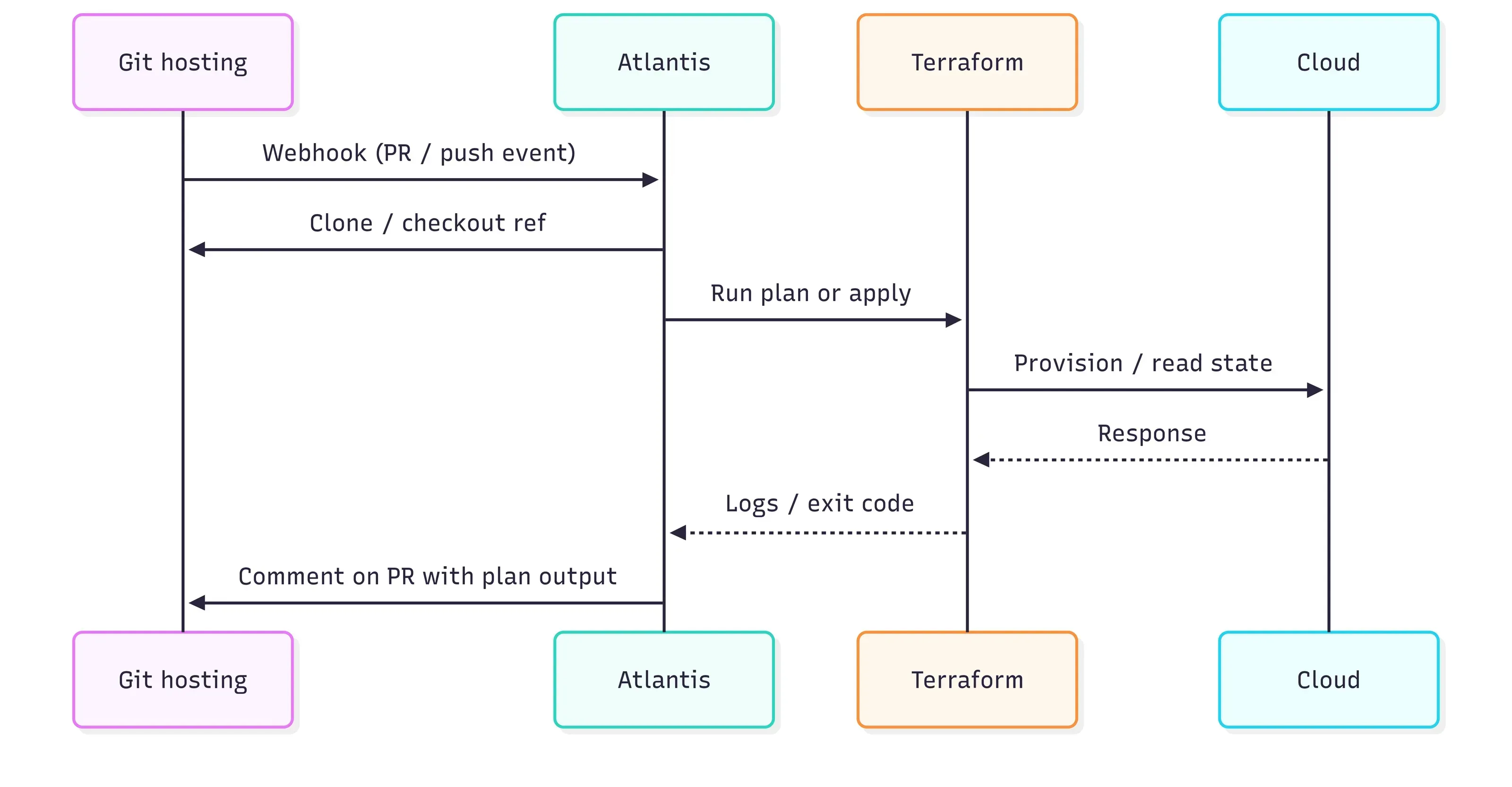
Figure 1 — Sequence diagram in between Git and Terraform
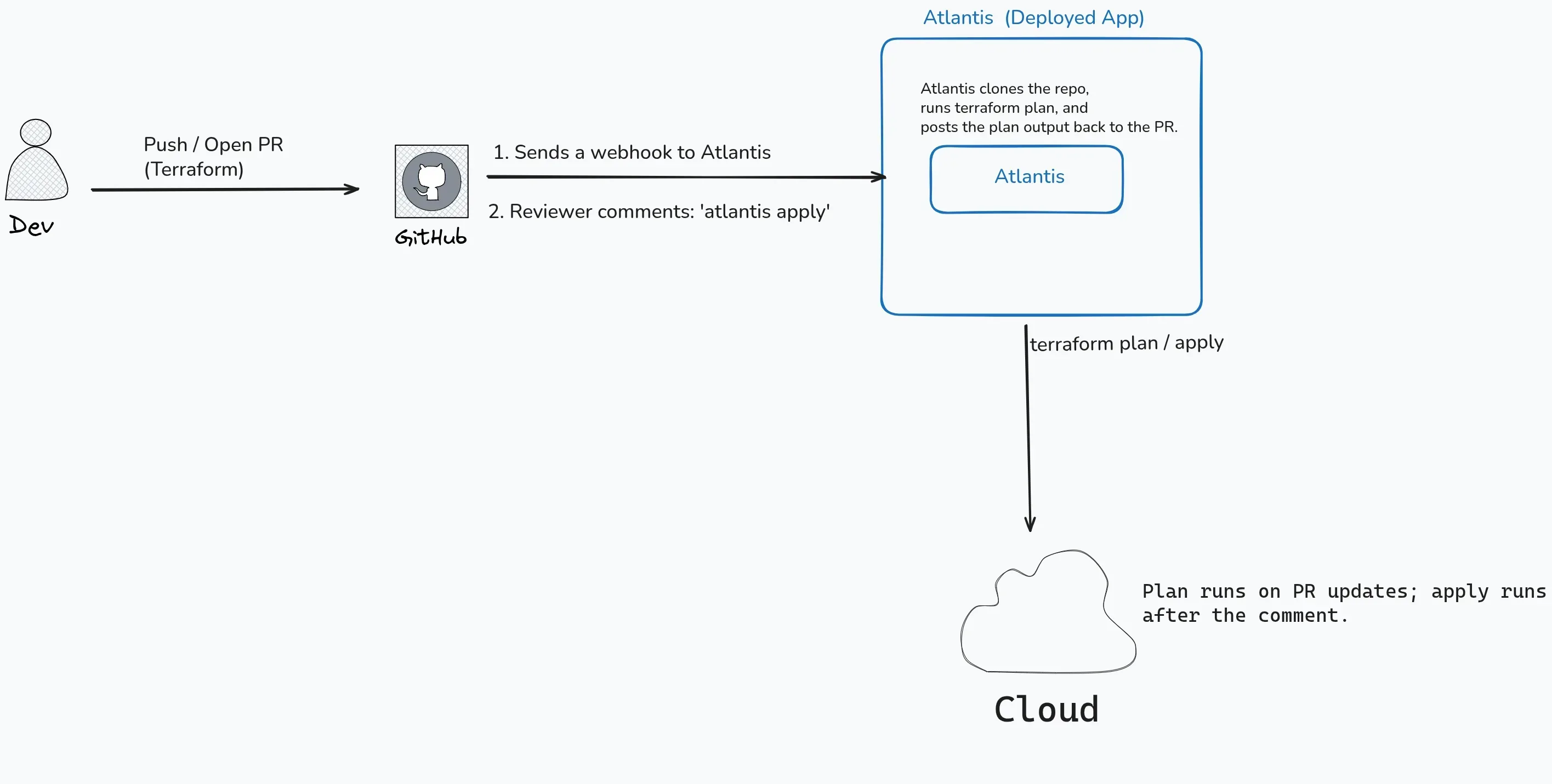
Figure 2 — This is what it looks like in a real flow
Pull requests: plan, review, then apply
This is where Atlantis feels different from “we run Terraform in CI sometimes”:
- You open a PR that changes
.tffiles (or paths Atlantis watches). - Atlantis runs
planautomatically or when someone comments (e.g.atlantis plan) — youratlantis.yamldefines the rules. - Plan output is posted on the PR — readable, diffable, linkable. Reviewers treat it like part of the code review.
- After approval (and optionally an explicit
atlantis applycomment, depending on config), Atlantis runs apply for that project only. - You merge when the branch matches what was applied and your checks pass.
Branch protection, required reviews, and no direct pushes to main turn this into a real gate: infra changes can’t bypass the same social and technical checks you use for apps. That’s the habit platform engineering needs — defaults, not heroics.
From gatekeepers to reviewers: what this means for platform engineering
Earlier I mentioned that our laptop workflow was blocking platform engineering. Here is what I mean by that.
In a ticket-based world, a developer who needs a new S3 bucket or a security group change opens a request and waits. An ops engineer picks it up, writes or tweaks the Terraform, runs it from their machine, and closes the ticket. The developer never sees the code, never learns how the infra works, and next time they need the same thing they open another ticket. Knowledge stays locked inside the ops team, and the ops team becomes a bottleneck that grows linearly with the number of product teams.
Self-serve means developers can propose infra changes themselves — open a PR, write or modify the .tf files, and see the plan output right there. They don’t need cloud credentials on their laptop. They don’t need to know how to run Terraform locally. They push a branch, Atlantis shows them what would change, and the ops team reviews it the same way a senior engineer reviews application code. If the plan looks safe and follows the team’s conventions, it gets approved and applied.
That shift changed our role. We stopped being the people who execute every infra change and became the people who define the guardrails — module structure, naming conventions, policy checks, approval requirements — and review what others propose. We still owned the Atlantis server, the IAM roles, and the shared modules. But the day-to-day “add a DNS record” or “open port 443 on the staging ALB” work moved to the teams who actually needed it, on their timeline, not ours.
This is exactly what platform engineering is about: make the right thing easy so that teams move fast without waiting for a central team to do it for them. Atlantis didn’t give us a developer portal or a shiny UI — it gave us a pull request as the universal interface for infra, and that turned out to be enough to break the bottleneck.
Multi-account architecture and Atlantis
Most real companies don’t have one AWS account; they have dev / staging / prod, workloads per team, or isolation by environment. Atlantis fits that model in a few common ways:
- One repo, multiple roots — Each folder (e.g.
accounts/prod,accounts/dev) is an Atlantis project inatlantis.yaml, with its own workflow, backend config, and usually a dedicated IAM role in the target account whose trust policy (the rule that says “I trust this specific caller to borrow my permissions”) allows the Atlantis infra-account principal to callsts:AssumeRole. - Cross-account assume role — The Atlantis runtime uses credentials from the infra account to assume those per-environment roles, so a plan for dev never runs with prod’s role unless you explicitly designed that (which you usually shouldn’t). Least privilege is enforceable in one place.
- Workspace or directory per environment — Same pattern as good Terraform hygiene: separate state per env, mapped to separate projects so Atlantis never “accidentally” plans everything at once unless you want a meta-project.
The mental model: Git branch + project name + workflow = which directory, which backend, which account, and which Terraform version. Multi-account stops being “who remembered to export the right AWS_PROFILE.”
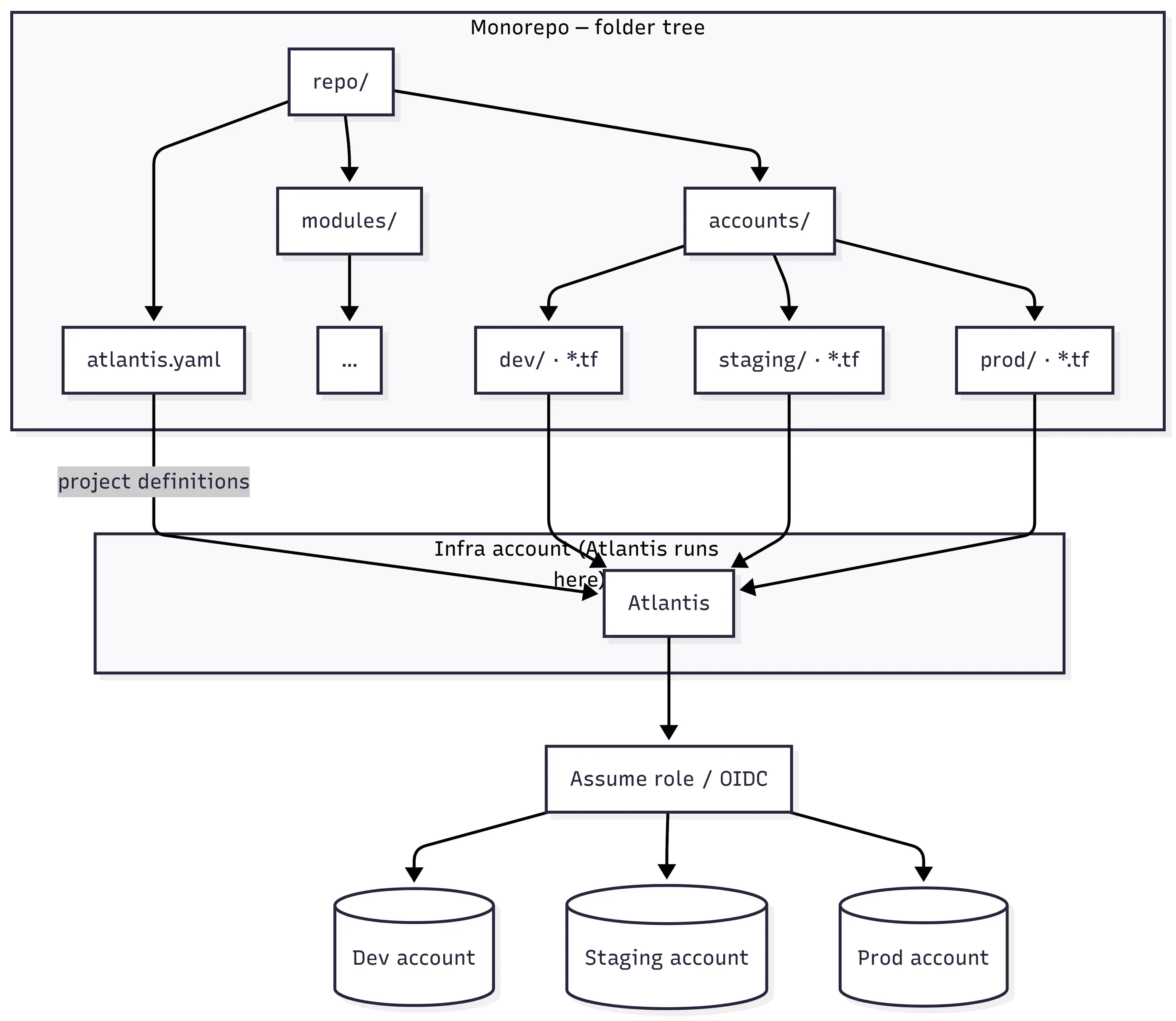
Figure 3 — Explicit mapping beats ambiguous laptop context
This is the structure we used in practice when we were working across multiple AWS accounts—root atlantis.yaml, shared modules/, and one directory per environment under accounts/. Atlantis clones exactly this tree and matches changed paths to the projects we defined in atlantis.yaml:
repo/
├── atlantis.yaml
├── modules/
│   ├── vpc/
│   │   ├── main.tf
│   │   └── variables.tf
│   └── eks/
│       ├── main.tf
│       └── variables.tf
└── accounts/
    ├── dev/
    │   ├── main.tf
    │   ├── variables.tf
    │   ├── terraform.tfvars
    │   ├── outputs.tf
    │   └── backend.tf
    ├── staging/
    │   ├── main.tf
    │   ├── variables.tf
    │   ├── terraform.tfvars
    │   ├── outputs.tf
    │   └── backend.tf
    └── prod/
        ├── main.tf
        ├── variables.tf
        ├── terraform.tfvars
        ├── outputs.tf
        └── backend.tf
Root atlantis.yaml matched that layout: one Atlantis project per folder under accounts/, shared modules/ on the autoplan path, and the same apply gates everywhere. Which IAM role to use is not implicit—each project points at its own workflow, and each workflow’s first step is an explicit sts assume-role into the target account (placeholder account IDs and role names below). Atlantis itself ran in our infra account; the long-lived identity there was only allowed to assume those per-env roles.
version: 3
parallel_plan: true
parallel_apply: false

# Atlantis server runs in infra account; each target role's trust policy allows
# that principal to sts:AssumeRole. Replace account IDs / role names with yours.

workflows:
  accounts-dev:
    plan:
      steps:
        # Before Terraform runs, assume the IAM role that belongs to the
        # target account. This is the "guest badge" pattern: Atlantis in
        # the infra account borrows dev-account permissions for this run only.
        - run: |
            CREDS=$(aws sts assume-role \
              --role-arn "arn:aws:iam::111111111111:role/atlantis-terraform-dev" \
              --role-session-name "atlantis-plan-${ATLANTIS_PULL_NUM:-0}" \
              --duration-seconds 3600 \
              --query 'Credentials' --output json)
            export AWS_ACCESS_KEY_ID=$(echo "$CREDS" | jq -r .AccessKeyId)
            export AWS_SECRET_ACCESS_KEY=$(echo "$CREDS" | jq -r .SecretAccessKey)
            export AWS_SESSION_TOKEN=$(echo "$CREDS" | jq -r .SessionToken)
        - init
        - plan
    apply:
      steps:
        # Same assume-role for apply — credentials are short-lived,
        # so we grab a fresh set for each phase.
        - run: |
            CREDS=$(aws sts assume-role \
              --role-arn "arn:aws:iam::111111111111:role/atlantis-terraform-dev" \
              --role-session-name "atlantis-apply-${ATLANTIS_PULL_NUM:-0}" \
              --duration-seconds 3600 \
              --query 'Credentials' --output json)
            export AWS_ACCESS_KEY_ID=$(echo "$CREDS" | jq -r .AccessKeyId)
            export AWS_SECRET_ACCESS_KEY=$(echo "$CREDS" | jq -r .SecretAccessKey)
            export AWS_SESSION_TOKEN=$(echo "$CREDS" | jq -r .SessionToken)
        - apply

  # accounts-staging and accounts-prod follow the exact same pattern —
  # only the --role-arn changes to point at the staging or prod account:
  #   arn:aws:iam::222222222222:role/atlantis-terraform-staging
  #   arn:aws:iam::333333333333:role/atlantis-terraform-prod
  # We omit them here to keep the example readable; in practice you copy
  # the block above and swap the account ID and role name.

projects:
  - name: accounts-dev
    dir: accounts/dev
    workflow: accounts-dev
    terraform_version: v1.6.6
    autoplan:
      when_modified:
        - "*.tf"
        - "*.tfvars"
        - "../../modules/**/*.tf"
      enabled: true
    apply_requirements: [approved, mergeable]

  - name: accounts-staging
    dir: accounts/staging
    workflow: accounts-staging
    terraform_version: v1.6.6
    autoplan:
      when_modified:
        - "*.tf"
        - "*.tfvars"
        - "../../modules/**/*.tf"
      enabled: true
    apply_requirements: [approved, mergeable]

  - name: accounts-prod
    dir: accounts/prod
    workflow: accounts-prod
    terraform_version: v1.6.6
    autoplan:
      when_modified:
        - "*.tf"
        - "*.tfvars"
        - "../../modules/**/*.tf"
      enabled: true
    apply_requirements: [approved, mergeable]
Placeholder account IDs (111…, 222…, 333…) and role names are examples. You need jq on the Atlantis runner for this inline pattern, or fold the run block into one repo script (e.g. ../../scripts/assume.sh "$ROLE_ARN") to deduplicate. Confirm the env var name your Atlantis build exposes for the PR number (we used ATLANTIS_PULL_NUM). Trust policies on each target role must allow the infra-account principal Atlantis uses to call sts:AssumeRole.
What Figure 3 is showing
The diagram, the repo tree, and the YAML above all describe one idea: an explicit mapping we relied on in practice — directory → Atlantis project → backend/state → IAM role → AWS account. Nothing was implicit; nothing depended on who was running it or which AWS_PROFILE they had exported.
One detail worth calling out: we did not use OIDC for the cross-account hop. It was classic trust policy + AssumeRole — one stable identity in the infra account, short-lived sessions into each target account. The arrows in Figure 3 are not “Atlantis installed three times”; they are one controller, many least-privilege sessions. It’s not that we created the infra account only to run Atlantis — we had other central services running there for the product team already, so it made sense to deploy Atlantis there too.
Once that mapping lived in Git and went through review like any other code, multi-account stopped being tribal knowledge locked in one person’s head and became visible to the whole team — exactly what we wanted when we moved off laptops.
What Atlantis does not solve
Atlantis fixed a lot for us, but it is not a silver bullet. If you go in expecting it to cover everything, you will hit these walls:
- Drift detection — Atlantis only knows about changes that come through pull requests. If someone logs into the AWS console and edits a security group by hand (ClickOps), Atlantis has no idea. You still need a separate process — periodic
terraform planruns, or a tool like driftctl — to catch what changed outside Git. - Policy enforcement — Atlantis itself does not check whether a change is a good idea. It will happily apply a security group that opens
0.0.0.0/0on port 22 if the PR is approved. For guardrails like “no public SSH” or “tags are mandatory,” you bolt on something like Conftest, OPA, or Sentinel as a pre-plan or pre-apply hook. Atlantis supports custom workflow steps for this, but it does not ship with policies out of the box. - High availability — Atlantis is a single server process. If it goes down, plans and applies stop until it comes back. There is no built-in clustering or failover. For most teams the risk is acceptable — a few minutes of downtime on the infra pipeline is not the same as a few minutes of downtime on production traffic — but you should know this going in.
- Long-running plans blocking the queue — If one project takes ten minutes to plan (large state, slow providers), it can hold up plans for other projects on the same server.
parallel_plan: truehelps by running independent projects concurrently, but a single slow project still ties up its worker. We hit this with our biggest account and ended up splitting the state to keep plans fast. - It is not a full alternative to Terraform Cloud / Spacelift / Env0 — Those platforms offer state management, a policy framework, a UI dashboard, cost estimation, and SSO out of the box. Atlantis is simpler, open-source, and self-hosted — which is why we chose it (no vendor lock-in, no per-run pricing, full control over the server). But if your team wants those extras without building them yourself, a managed platform might be the better fit. Know the trade-off before you commit.
None of these stopped us from using Atlantis. They are the things we had to plan around or solve separately. Knowing them up front would have saved us some surprises.
Final thoughts
I wrote this to explain why Atlantis helped us, not how to install it. Before that, we ran Terraform on our own laptops. It was messy. The shared file could get stuck. Not everyone used the same version. Sometimes what went live was not what was on the main branch. Only the ops team could run it. With Atlantis, the preview and the real run live on one server and hook into Git. Logins and the Terraform version stay there too. People review it like any other code.
Somewhere along the way we told ourselves that because we worked with Terraform every day, it was really “our” thing—that developers who build the apps would get lost in the tf files world, so only the ops side should change what runs under the apps felt like the safe, fair rule. That idea did not last. Those same developers already learned whatever language their services are written in; they could learn how those files work too, especially when the “what would change” printout sits next to the rest of the code they are already reviewing on Git. We were not really saving them from confusion—we were used to being the only ones who touched it. Letting more people in did not make that work careless; it made it something we review and approve like the rest of the code.
What you need before you start
This is not an install guide, but if the post convinced you to try Atlantis, here is the short list of what you will need on the table before you begin:
- A Git repo with Terraform code — If your infra isn’t in Git yet, that’s step zero. Atlantis has nothing to hook into without it.
- A server or pod to run Atlantis — A VM, a Kubernetes Deployment, an ECS task — anything that can stay running and receive HTTP traffic. Atlantis is a single Go binary; it doesn’t need much.
- A webhook from your Git provider — GitHub, GitLab, Bitbucket, or Azure DevOps. You point the webhook at the Atlantis server’s URL so it gets notified on PR events.
- A Git access token — So Atlantis can clone repos and post comments on PRs. Usually a machine user or a GitHub App.
- Cloud credentials on the server — The IAM role, service account, or whatever your cloud uses. This replaces the credentials that used to live on everyone’s laptop.
- An
atlantis.yamlin your repo — Defines which directories are projects, which Terraform version to use, and which workflow (like the assume-role pattern we showed) to run for each.
The Atlantis installation guide walks through each of these in detail. The hardest part, honestly, is not the setup — it’s convincing your team to stop running Terraform from their laptops.
Till the next time — Happy learning :)