Why AWS SCPs Matter: Managing Compliance Across Multiple Child Accounts

It was a Thursday afternoon. The time where your brain is already halfway into the weekend. You're wrapping up tickets, maybe reviewing one last PR, and thinking about friday party 🍻. Then a message lands in the team Slack channel. It's from someone in security, and the tone is the kind of calm that means something isn't calm at all: "Hey, is this S3 bucket supposed to be public?"
I clicked the link and it was a sandbox account. One of those AWS accounts which we had created for engineers to try things, break things, learn things, nobody cares. This developer, a solid engineer, someone I would rate high, had created a bucket to test a data upload flow and made that bucket public so an external script could push files in. It was for quick test, was supposed to delete it after testing but forgot. That was three weeks ago.
A public bucket in a sandbox with test data? Bad, sure. Embarrassing, maybe. But not the end of the world for sure, unless you look at what else is in that account.
Months earlier, someone had created a cross-account IAM role in that same sandbox. The reason was innocent: they needed to debug a data pipeline that ran in production, and the quickest way was to assume a role from the sandbox into the prod account. A temporary fix. Except it was never temporary. The role was still there. The trust policy was still open. And now that sandbox, the one with the public bucket that anyone on the internet could find, had a direct, assumable path into our production environment.
The bucket itself didn’t touch prod. But the bucket made the sandbox reachable. And the sandbox had a door into prod that nobody remembered existed. That’s the chain that kept us up that night: public bucket → sandbox compromise → cross-account role → production data pipeline. Four hops from the internet to prod, and not a single guardrail said “stop.”
We had twelve AWS accounts, three teams, and no controls that could have prevented any of this. That Thursday changed how we thought about cloud security. Not because someone did something wrong, but because nothing in our setup told them they couldn’t.
Why I’m writing this
After that Thursday, we spent a lot of time fixing the immediate problem and then a lot more time asking “what else could go wrong ?” The answer was uncomfortable. We had accounts with no region restrictions, no protection on CloudTrail, no rules about public access. Nothing. And the weird part? We weren’t a small startup anymore. We had IAM policies. We had code reviews. We just didn’t have anything that worked across accounts.
SCPs were the answer to that. And when I went looking for a good explanation of how they actually work, not the AWS docs version, but the “why should I care and where do I start” version. I couldn’t find one that told the whole story, so I wrote it.
How you end up with fifteen accounts and no rules
Most companies don’t start with twelve AWS accounts. You start with one. Everything lives there: prod, dev, that one Lambda someone wrote for a demo. Then someone from the team says “let’s separate prod and dev environment.” Good call. Then staging shows up. Then sandbox. Then shared-services, security, logging, all that. Before you know it, you have ten or fifteen accounts under your AWS Organization.
Each team gets their own account with a clean blast radius, and everyone’s happy because they can do whatever they want.
But nobody talked about what came with those accounts: every single one had full AWS permissions by default. Any admin in any account could spin up resources in any region, open security groups to 0.0.0.0/0, create IAM users with long-lived access keys, or disable CloudTrail logging. Not because they wanted to break things. Because AWS doesn’t stop you unless you tell it to.
The part that surprised me when I first understood this: IAM doesn’t solve it. IAM is great, but it works inside an account. When you have fifteen accounts and each one has its own admins, IAM can’t enforce rules across all of them. And nothing else was filling that gap.
We trusted people to do the right thing, and most of the time they did. But that only works until it doesn’t.
What happened when we didn’t have SCPs
The first incident was the S3 bucket. A sandbox account, the kind engineers use to test things, had a bucket that someone made public. The bucket name was generic enough that a scanner found it. The data inside wasn’t sensitive, but the path from that sandbox to prod data through a shared role was. Security flagged it. Leadership asked questions. It wasn’t fun.
The second one was quieter but worse. Someone spun up a bunch of EC2 instances in ap-southeast-1, a region we don’t operate in and nobody monitors. The bill showed up three weeks later, and it turned out those instances were mining crypto because the credentials had leaked from a personal repo. The account had no restrictions on which regions you could use.
The third one was a classic. A well-meaning engineer disabled CloudTrail in a dev account because “the logs were noisy.” For two months, we had zero visibility into what happened in that account. Auditors had questions we didn’t have good answers to.
None of these people were bad actors. They were engineers doing engineer things in accounts that let them do anything. We just never thought about what happens when “anything” includes the wrong thing.
So what exactly is an SCP?
SCP stands for Service Control Policy. It’s a feature of AWS Organizations, the service that lets you manage multiple AWS accounts under one roof. If you haven’t used Organizations before: you create one from a root AWS account (which becomes the management account), then you either create new accounts inside it or invite existing ones. Once they’re in, you group them into Organizational Units (basically folders). That’s your org. SCPs are the rules you attach to those folders.
Two things to hold in your head:
- IAM policies say what a user or role can do.
- SCPs say what an account is allowed to do at all, regardless of what IAM says.
Think of it this way. IAM is the lock on your apartment door. An SCP is the building rule that says “no one in this building can install a gas stove.” It doesn’t matter if you have the key to your apartment, the building won’t allow it. IAM controls who can do what inside an account. SCPs control what’s even possible in that account to begin with.
How SCPs actually work
AWS Organizations has a tree structure:
- Management account (root): sits at the top. SCPs do not restrict this account. We’ll come back to why that matters.
- Organizational Units (OUs): folders for grouping accounts. You might have
Production,Development,Sandbox,Security. - Member accounts: the actual AWS accounts that live inside OUs.
You attach SCPs to OUs or individual accounts. The policies flow downward. If you attach an SCP to the Production OU, every account inside it is bound by that policy. A child account can’t override it. Neither can an admin inside that account. Which is exactly why they exist.
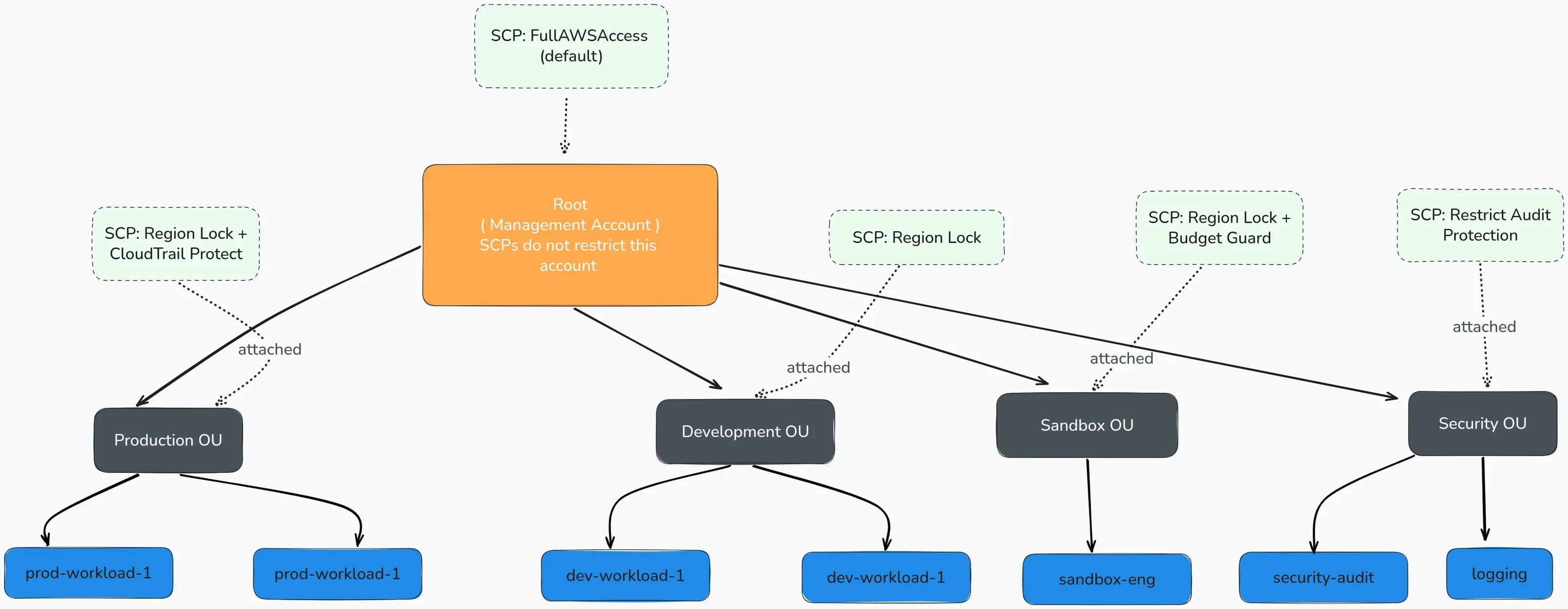
Figure 1 — SCPs attach to OUs or accounts and flow downward through the tree
The intersection model
This is the part that trips people up, including people who’ve been doing AWS for years. SCPs don’t grant permissions. They limit what’s possible.
The effective permission for any action is the intersection of what IAM allows and what the SCP allows.
If IAM says “yes” but the SCP says “no”, the answer is no. Always. No exceptions for any principal in that account (except the management account). And if the SCP says “yes” but IAM doesn’t grant it, still no. SCPs don’t grant anything. They set the maximum boundary.
A concrete example: an engineer in your sandbox account has an IAM role that allows ec2:RunInstances, so they can spin up EC2 instances. But there’s an SCP on the Sandbox OU that denies all actions outside us-east-1 and eu-west-1. The engineer tries to spin up an instance in ap-southeast-1. IAM says yes. SCP says no. Result: AccessDenied. The engineer never gets that instance, and you never get a surprise bill from Singapore. The intersection in practice. IAM gave them the key, but the SCP said that room doesn’t exist.
It gets more interesting when you stack multiple SCPs across nested OUs. The effective SCP for an account is the intersection of all SCPs from the root down to that account. If any SCP in the chain denies an action, it’s denied. A broad allow at the root and a tight deny at a child OU works fine, but an allow at a child OU cannot override a deny from a parent. The chain only gets tighter, never looser. We lost a couple of hours figuring this out when a “permissive” SCP on a dev OU didn’t actually override a deny we’d set higher up.
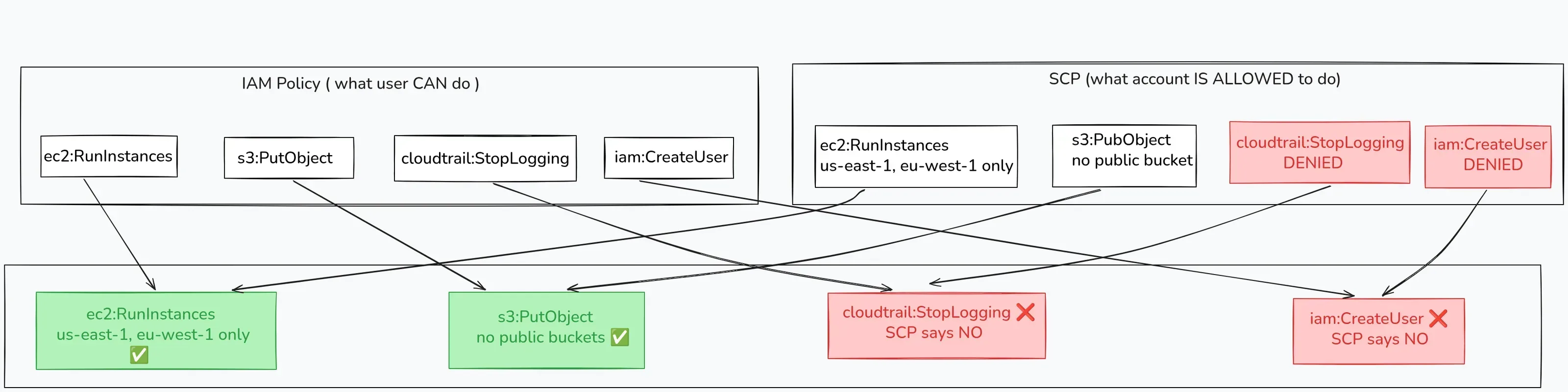
Figure 2 — The effective permission is where IAM and SCP overlap; deny always wins
Two strategies: deny list vs allow list
There are two ways to write SCPs:
Deny list (most common): Start with the default FullAWSAccess SCP that AWS attaches to every OU. Then add explicit deny statements for things you don’t want. “You can do everything except these specific things.”
Allow list (strict): Remove the FullAWSAccess SCP. Now nothing works. Then add only the services and actions you explicitly allow. “You can only do these things and nothing else.”
Most organizations use the deny list approach. It’s practical. Allow lists are powerful but fragile. Miss one action and a team can’t do their job, and your Monday starts with a lot of Slack messages.
We started with deny lists, just two or three things we absolutely didn’t want happening, and that was our first SCP. You can get more sophisticated later, but don’t try to build the perfect policy on day one. Build the useful one first.
Common SCP patterns people actually use
Region restriction: Only allow API calls in approved regions. If your company operates in us-east-1 and eu-west-1, deny everything elsewhere. This is the one that would have stopped the crypto mining incident in our case. Be careful with global services like IAM, CloudFront, and Route 53 though, since they operate out of us-east-1 regardless, so your deny needs exceptions for those.
Block public S3 access: Deny s3:PutBucketPolicy and s3:PutBucketPublicAccessBlock changes that would make buckets public. Pair this with the S3 account-level public access block.
Prevent CloudTrail tampering: Deny cloudtrail:StopLogging and cloudtrail:DeleteTrail. Nobody in a member account should be able to turn off the audit trail. This is the one that would have stopped incident which occurred in our dev account.
Restrict IAM user creation: Force teams to use federated roles (SSO) instead of creating IAM users with long-lived access keys.
Protect security tooling: Deny actions that would disable GuardDuty, Security Hub, or Config in member accounts.
Each of these maps directly to something we either broke or heard about someone else breaking. Region restriction and CloudTrail protection alone would have prevented two of our three incidents, so that’s where we started. The best SCPs come from things that already went wrong somewhere.
So what does one of these actually look like? Here’s a simplified region-restriction SCP, the kind that would have stopped the crypto mining incident:
{
  "Version": "2012-10-17",
  "Statement": [
    {
      "Sid": "DenyOutsideApprovedRegions",
      "Effect": "Deny",
      "Action": "*",
      "Resource": "*",
      "Condition": {
        "StringNotEquals": {
          "aws:RequestedRegion": [
            "us-east-1",
            "eu-west-1"
          ]
        },
        "ArnNotLike": {
          "aws:PrincipalARN": "arn:aws:iam::*:role/OrganizationAccountAccessRole"
        }
      }
    }
  ]
}
This denies any API call outside us-east-1 and eu-west-1. The ArnNotLike condition excludes the org access role so you don’t lock yourself out of managing the account. In practice, you’d also add exceptions for global services like IAM, STS, CloudFront, and Route 53, since they need us-east-1 even if you operate elsewhere. But this is the skeleton. One JSON document, attached to an OU, and suddenly nobody in those accounts can spin up anything in Singapore or São Paulo. That’s it. That’s the guardrail.
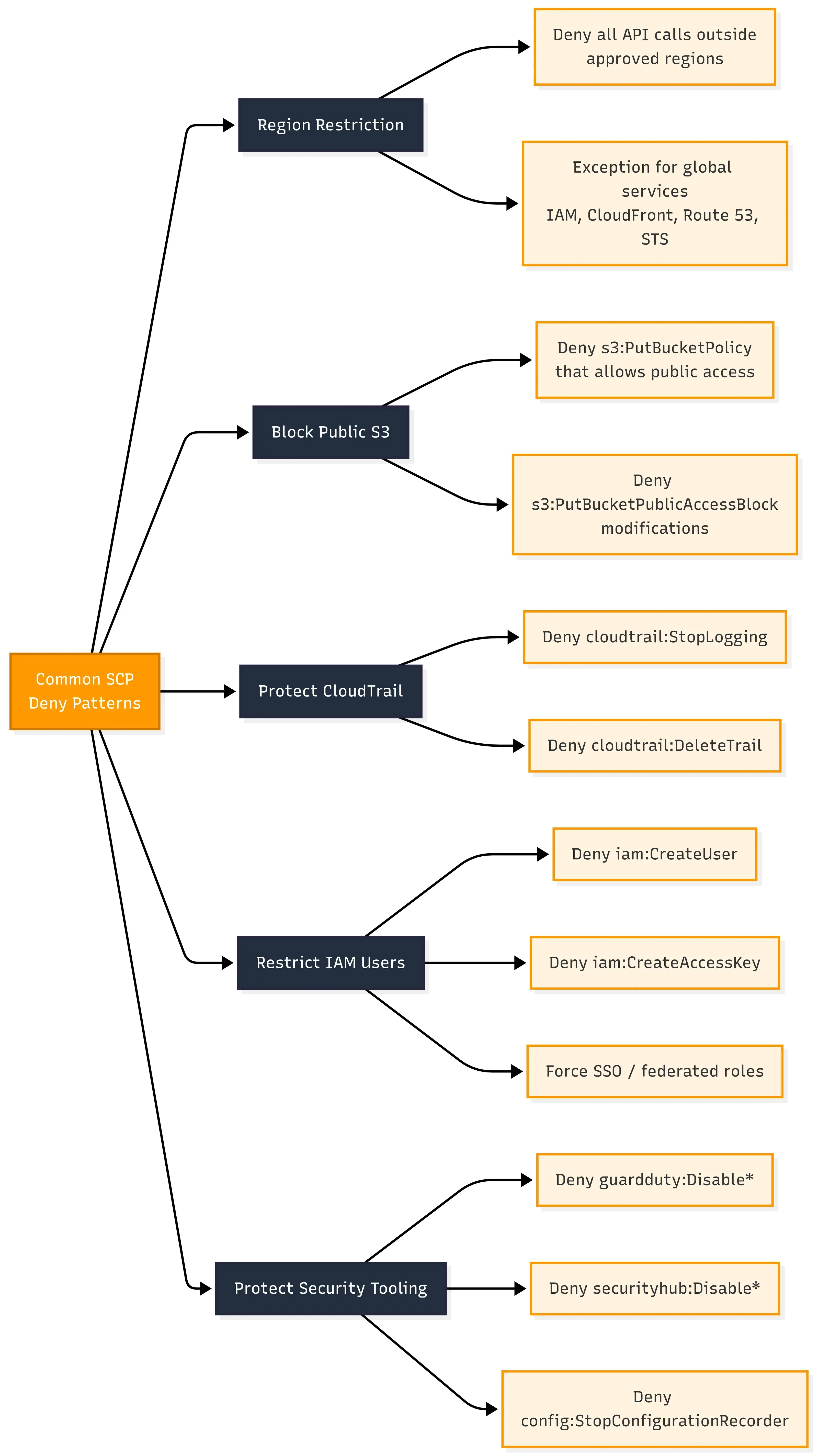
Figure 3 — These are themes, not copy-paste policies. Validate against current AWS docs
Designing SCPs for your organization
This is what worked for us after a few iterations.
OU structure matters
Your SCP strategy is only as good as your OU design. Honestly, we spent more time arguing about the OU tree than writing the actual policy JSON. A flat tree with one SCP everywhere is easy to start with but painful to maintain. A well-thought-out tree lets you be strict where it matters and flexible where it should be.
We use something like this:
Root
├── Security OU        → strictest SCPs (protect audit, logging)
├── Infrastructure OU  → network, shared services
├── Production OU      → region lock, no public access, no CloudTrail changes
├── Staging OU         → similar to prod, slightly relaxed
├── Development OU     → region lock, but more service freedom
├── Sandbox OU         → region lock, budget alerts, deny production data access
└── Suspended OU       → deny all (for decommissioned accounts)
Each OU gets layered SCPs, with Production getting the tightest set and Sandbox having restrictions but more room to experiment. Suspended gets a blanket deny so accounts parked there can’t do anything at all.
The thing that clicked for us: where you put an account matters as much as what policies you write. Moving an account from the Sandbox OU to the Production OU instantly changes what it can and can’t do. We used that when onboarding new workloads: start in the dev OU, graduate to the prod OU when ready.

Figure 4 — Different OUs get different guardrails based on risk
Testing before you break things
This part we learned the hard way.
-
Start in a test OU. Create a throwaway OU, move a non-critical account into it, attach the SCP, and test. Try the things the SCP should block. Try the things it shouldn’t block. Both matter.
-
Think about your pipelines. If your CI/CD uses cross-account roles, those roles are subject to SCPs too. We once deployed an SCP that blocked
sts:AssumeRolefor a condition we didn’t test, and our deployment pipeline went down for two hours and nobody could deploy anything. Test your automation against new SCPs before you roll them org-wide. Your pipeline is your first customer, not your last. -
Document the break-glass path. When (not if) an SCP blocks something legitimate, who can fix it? The management account is the only one SCPs don’t restrict. Keep access to that account tight and documented: two people, MFA, and a runbook. Not “someone knows how.” A written, tested runbook. I’ve seen teams locked out of their own accounts because the break-glass process was tribal knowledge and the person who knew it was on vacation.
-
Version control your SCPs. Treat them like infrastructure code. Review them in PRs. Don’t hand-edit in the console. If you’re using Terraform or CloudFormation for everything else but writing SCPs by hand in the AWS console, that’s a gap. SCPs should follow the same code review and deployment pipeline as everything else in your org. If you want to see what that looks like in practice (plans and applies tied to pull requests instead of someone’s laptop), we wrote about exactly that pattern with Atlantis. The same discipline applies here: no one should be pushing SCP changes without a reviewed PR.
What SCPs don’t solve
I’ve seen teams deploy a few SCPs and then relax like the job is done. It’s not. SCPs solve one layer. The rest is still on you.
The management account is exempted, completely. Your root account can do anything regardless of what SCPs you’ve set. This scared us mentally more than technically because we kept thinking “everything is locked down” and had to keep reminding ourselves that the management account was the exception. Keep it clean with almost no workloads in the root account, the fewest possible humans with access, and strong MFA. That account is the master key to the building.
You still need IAM. SCPs has limits of what’s possible at the account level, but inside each account you still need proper least-privilege policies. An SCP that allows ec2:* doesn’t mean every user should have ec2:*. Without tight IAM underneath, you’re just trading one problem for another.
The other thing that caught us off guard is the silence. When an SCP blocks something, it just… blocks it. You don’t get an alert or a notification. The user gets an AccessDenied error and maybe files a ticket, or maybe just tries something else. If you’re not watching CloudTrail for denied events, you won’t know what your SCPs are actually catching, or whether someone’s bumping into them every day because the policy is too tight. We added a CloudWatch alarm on AccessDenied from SCP-related denials and it was eye-opening. Deploy the rule, then watch what hits it.
They’re not retroactive. We deployed an SCP to block public S3 bucket creation, felt good about it, and then found three buckets that were already public from before the SCP existed. SCPs prevent future actions. They don’t fix existing state. You still need something (Config rules, audit scripts, whatever) to clean up what’s already there.
There are also size limits, which are more annoying than you’d think. Each SCP maxes out at 5,120 characters. You can attach up to 5 per OU or account. That sounds like plenty until you start writing conditions for region restrictions with global service exceptions. We burned a full afternoon trying to fit everything into one policy before learning to split them by theme: one for region, one for S3, one for CloudTrail. Design for the constraint early or you’ll refactor later.
Final thoughts
I think about that Thursday sometimes. Not because it was dramatic, since no one got fired, no data was leaked, and the bucket got locked down within the hour. I think about it because of how easy it was to get there. Good engineers, reasonable decisions, and a setup that had no opinion about any of it.
SCPs didn’t make us smarter. They just made it harder to do the things we already knew we shouldn’t. Region lockdown means nobody spins up crypto miners in Singapore. CloudTrail protection means nobody silences the audit log because it’s “noisy.” Public access blocks mean a sandbox stays a sandbox.
We started with two deny policies and a test OU. It wasn’t fancy. It didn’t need to be. If you don’t have SCPs yet, go look at your org. Ask what’s in place. If the answer is “nothing” or “I’m not sure,” that’s not a failure. That’s just where you start.
Till the next time. Happy learning :)