CloudFront in Front of ALB: Receiving Traffic Only from the CDN

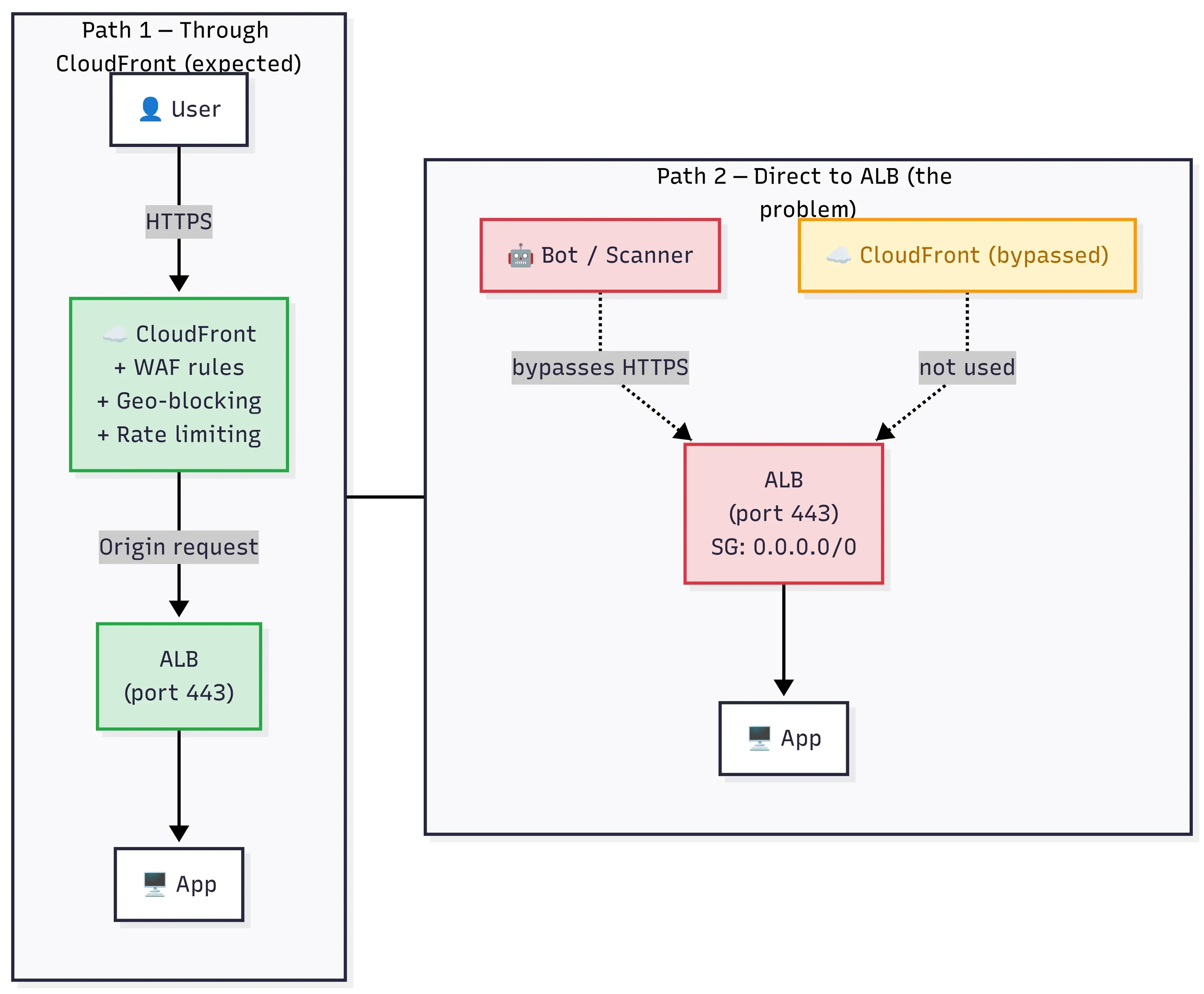
Putting CloudFront in front of an ALB doesn't close the ALB. If the security group still allows 0.0.0.0/0, the CDN is one path of many — and bots find the others.
We were using CloudFront in front of our ALB. Caching was working, TLS was terminating at the edge, latency numbers were looking good, the whole setup felt correct. Then one morning Vikash (from our team) was digging through ALB access logs for a latency spike and noticed something odd there. Request IDs that did not match anything on the CloudFront side. A bunch of traffic was hitting the ALB directly, completely bypassing CloudFront.
The ALB was still listening on 443 with its security group set to 0.0.0.0/0 thus anyone who knew our ALB’s public DNS name could talk to our origin without going through CloudFront. No caching, no WAF rules, no geo-restrictions. None of the controls we thought we had. 🤔
Configuring ALB to only accept traffic from CloudFront was the fix. We should have done it from the start.
One thing worth saying here is that we were working in Fintech. Payment flows, PII, regulatory audits. The kind of environment where “a bot could reach our origin” was enough to trigger an incident within our security team. That’s why we went as deep as we did.
What we actually saw in the logs
It started with a latency investigation that turned out into a security conversation. The ALB logs had entries with user-agents that were clearly scanners and bots, things like python-requests/2.28, Go-http-client/1.1. These requests had no corresponding X-Amz-Cf-Id header, which is the header CloudFront adds on every request that it forwards to the origin. That’s how we got to know that these weren’t coming through the CDN for sure.
Some of them were harmless. Health check probes, maybe a developer testing the ALB URL directly. But some were clearly probing. Paths like /.env, /wp-admin, /actuator/health, the usual stuff that bots throw at anything with a public IP. The ALB was returning 404s for most of them, which is fine, but the point wasn’t whether they found anything or not. The point was that they could reach the origin at all.
We had spent time setting up WAF rules on the CloudFront distribution, rate limiting, geo-blocking, managed rule groups for known bad IPs. All of that was useless against traffic that never touched CloudFront. (The picture at the top of the post is exactly that gap — CloudFront is one path, but the open ALB allows several others.)
The gap we missed
For anyone who has not worked with this setup before: CloudFront is AWS’s CDN, edge servers which are spread around the world that cache content and terminate TLS close to the user. The ALB (Application Load Balancer) sits inside your VPC and routes traffic to your actual app, ECS tasks, EC2 instances, whatever. When you put CloudFront in front of an ALB, you are telling CloudFront “forward requests to this load balancer.” CloudFront talks to the ALB’s public DNS name, the ALB routes to your app, response flows back out.
The security group on the ALB is essentially a firewall rule. It controls which IPs can connect on which ports. Ours said: allow 443/tcp from 0.0.0.0/0. The whole internet. CloudFront was one of those connections, sure, but so was everything else. We assumed that because CloudFront was forwarding traffic to the ALB, it was the only thing talking to the ALB. That’s not how any of this works. Setting CloudFront as the origin doesn’t block anything. It just adds one more path to an ALB that was already open to everyone.
Think about it for a second, we basically put a guard at the front gate and forgot the back door which didn’t even have a lock on it.
So we needed to do two things - lock the security group down to only CloudFront IPs, and then figure out a way to make sure it’s actually our CloudFront and not just anyone’s in AWS cloud (Not everyone would go to this length to fix the second point but we did, We have discussed “why” later in the blog).
Layer 1: Security group with CloudFront’s managed prefix list
First thing we did: restrict the ALB’s security group to only allow inbound traffic from CloudFront’s IP ranges. AWS publishes these ranges, and they change regularly as CloudFront adds and removes edge locations. You could maintain the list yourself by pulling from https://ip-ranges.amazonaws.com/ip-ranges.json and filtering for CLOUDFRONT, but that’s a maintenance headache nobody wants.
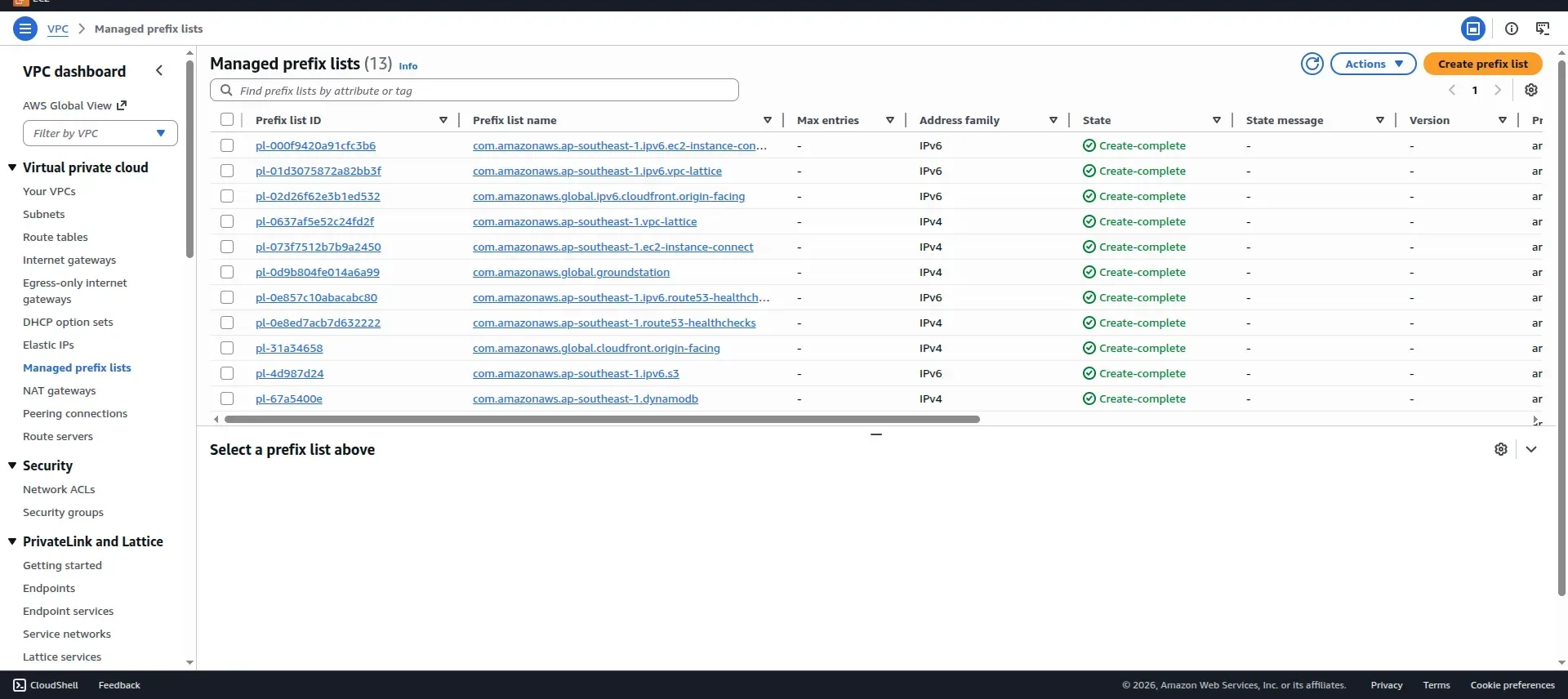
AWS solved this with managed prefix lists. A prefix list is a set of CIDR blocks that AWS maintains and updates automatically and the list is there by default in every AWS Account in every region and you can see it in the vpc console itself (check the screenshot below). For CloudFront, the managed prefix list ID is com.amazonaws.global.cloudfront.origin-facing. You reference it in your security group rule instead of hardcoding IP ranges, and AWS keeps it current.
Here’s what the security group change looks like conceptually:
Before (what we had):
Inbound rules:
  443/tcp  →  0.0.0.0/0   (the whole internet)
After (what we changed to):
Inbound rules:
  443/tcp  →  com.amazonaws.global.cloudfront.origin-facing  (CloudFront IPs only)
That’s it, one rule and the ALB stops accepting connections from anything that isn’t a CloudFront edge node - no Lambda polling ip-ranges.json, no cron job updating security groups, the prefix list handles all of it.
Now before we move on, there is one thing that i want to explain which confuses a lot of people when they first start working with CloudFront and origin restrictions so we thought it’s worth putting it here since it’s back to basics after all 😄
When a user hits your CloudFront distribution, they connect to an ingress IP — that’s whatever d1234.cloudfront.net resolves to (something like 13.224.x.x). But when CloudFront forwards that request to your ALB/Origin, it doesn’t come from that same IP. The traffic leaves from a completely different set of IPs — the origin-facing IPs (something like 52.46.x.x). These origin-facing IPs are the ones in the managed prefix list, not the CDN endpoint IPs that users connect to.

Ingress IPs (what users connect to) vs Origin-facing IPs (what your ALB sees)
So when you put that prefix list on the security group, you’re allowing the origin-facing pool, not the CDN endpoint pool. We’ve seen people try to allowlist the IP that their CloudFront URL resolves to and then wonder why traffic still gets blocked. Different IPs, different purpose.
If you’re using Terraform, the reference looks something like this:
data "aws_ec2_managed_prefix_list" "cloudfront" {
  name = "com.amazonaws.global.cloudfront.origin-facing"
}

resource "aws_security_group_rule" "alb_from_cloudfront" {
  type              = "ingress"
  from_port         = 443
  to_port           = 443
  protocol          = "tcp"
  security_group_id = aws_security_group.alb.id
  prefix_list_ids   = [data.aws_ec2_managed_prefix_list.cloudfront.id]
}
One thing that caught us: managed prefix lists count against the security group rule limit. The CloudFront prefix list has a decent number of CIDR blocks (it varies, but think 50–80 entries). Each CIDR counts as one rule. If your security group is already close to the default limit of 60 rules, you’ll hit the ceiling. We had to request a quota increase. Not a big deal, but it’s a surprise if you don’t expect it.
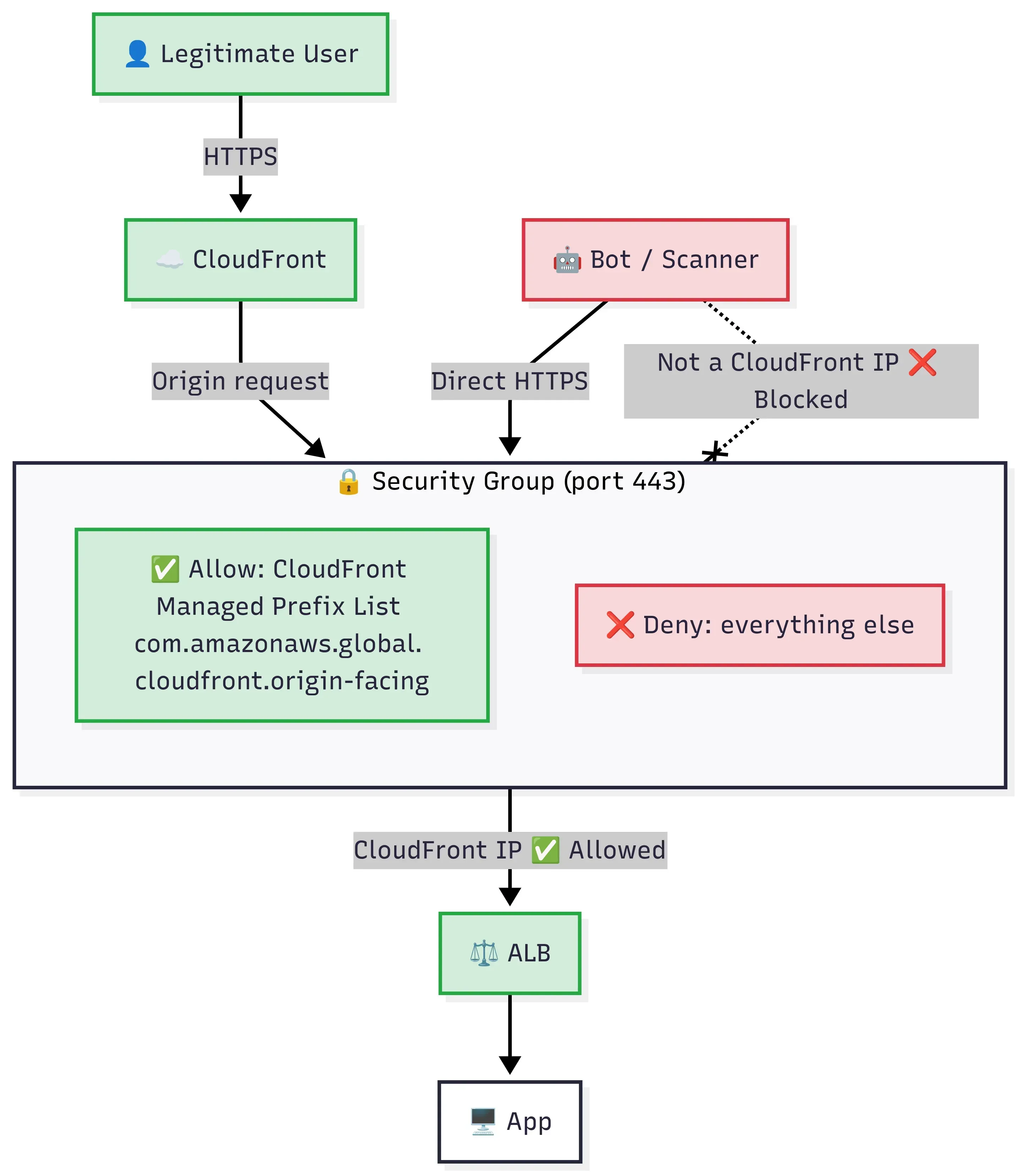
Figure 1: Network-layer restriction at the ALB
We fixed the 0.0.0.0/0 problem, and then realized we weren’t done
After we rolled out the prefix list change, the ALB logs got a lot quieter. The bot scanners, the python-requests probes, the random hits to /.env, all gone. The security group was doing its job. Only CloudFront IPs could reach port 443. We closed the ticket, updated the runbook, and moved on. Felt good honestly 😌
We thought we were done too. Then came the security review.
About a week later, during a security review that we had with our security compliance team, a team member raised a question which really made us uncomfortable, someone asked: “So what happens if someone in a completely different AWS account creates their own CloudFront distribution and points it at our ALB?”.
We sat with that question for couple of minutes. And yeah, the answer was: it would totally work. Their traffic would arrive at our ALB from CloudFront edge IPs. The exact same IPs our own distribution uses. The security group would let it right through. Because here’s the thing we hadn’t thought about: every CloudFront distribution in the world shares the same pool of edge IPs. Your distribution, my distribution, some random person’s distribution in a completely unrelated AWS account, they all route through the same edge nodes. The managed prefix list doesn’t know which distribution the traffic belongs to. It only knows the source IP is a CloudFront edge. That’s all it can know.
Would it be hard for an attacker to pull this off? Honestly, yes. They’d need to know your ALB’s DNS name first, and that takes some digging. Certificate transparency logs, DNS enumeration, a leaked internal doc. There are ways, but it’s not hard. For most businesses this is an acceptable risk and the prefix list alone is enough. But when you’re handling payment data and regulators ask “can you guarantee that only your infrastructure talks to your origin?”, “probably, because it’s hard to find” isn’t an answer that we can use at that time. They don’t need access to your AWS account. They just need to create a CloudFront distribution in their account, set your ALB as the origin, and their requests show up at your doorstep looking exactly like legitimate CDN traffic. Your security group has no way to tell the difference.
And this isn’t just an AWS thing. Cloudflare, Akamai, Fastly, same deal. They all share edge IPs across customers. If you restrict your origin to “only Cloudflare IPs,” you’re trusting every Cloudflare customer, not just yourself. The IP allowlist gets you halfway. It stops random internet traffic. It doesn’t prove the traffic is yours.
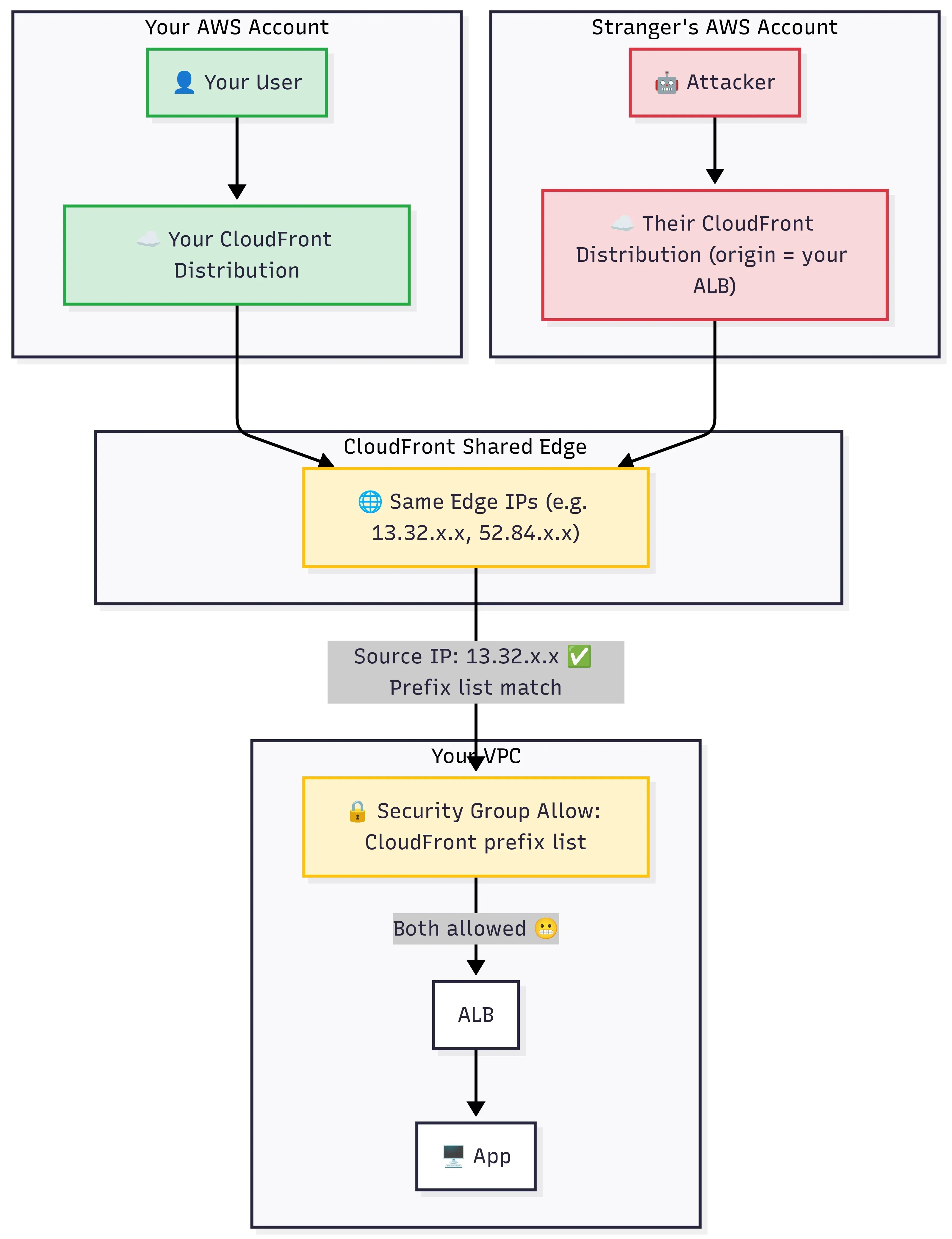
Figure 2: Prefix list says "this is CloudFront traffic", it can't say "this is your CloudFront traffic"
Layer 2: Secret origin header, making sure it’s our CloudFront
OK so the IP check works. But how do we make the ALB tell our CloudFront apart from someone else’s?
You make your CloudFront distribution send a secret header with every request it forwards to the origin, and you make the ALB reject anything that doesn’t carry it. If someone else’s CloudFront hits your ALB, they don’t know the secret. ALB drops the request.
The mechanism is a custom origin header. When you define the origin in your CloudFront distribution, there’s an option to add headers that CloudFront will inject into every request it sends to the origin. You’d set something like:
Header name:   X-Origin-Verify
Header value:  some-long-random-string-that-only-you-know
CloudFront strips this header from the viewer request before forwarding, so end users never see it and can’t spoof it. Only CloudFront adds it to the origin request. That stranger’s CloudFront distribution pointing at your ALB? It doesn’t know your header value. It can reach the edge IPs, sure, but the ALB will reject the request because the secret doesn’t match. So now you’ve got the prefix list proving the traffic came from CloudFront, and the header on top of that proving it came from your CloudFront specifically.
On the ALB side, you need something that checks for it. We used an ALB listener rule, a simple condition that checks for the header and its value, and returns 403 for anything that doesn’t match. It’s not fancy, but it works and it keeps the setup simple. The request never reaches your app if the header is wrong.
We rotated this header value every 90 days, it’s stored in Secrets Manager and a Lambda handles the rotation — updates the CloudFront origin header and the ALB listener rule in one go, not the most exciting piece work but it closes the required gap.
If you’re on Cloudflare instead of CloudFront, they have Authenticated Origin Pulls (mutual TLS) and custom headers. Akamai has something similar. Same idea, different names, your CDN proves its identity to the origin.
Where we put WAF (and where we didn’t)
You can attach WAF in two places here: on the CloudFront distribution (edge WAF) or on the ALB itself (regional WAF). We only used WAF on CloudFront.
That’s where we put rate limiting, geo-blocking, and AWS managed rule groups, bot control, known bad inputs, the usual. The logic: block as much garbage as possible before it even reaches your origin. You pay for WAF per request, and CloudFront sees all traffic first, so filtering early saves money and keeps origin load down. After the prefix list change, the only traffic reaching the ALB was already coming through CloudFront, so the edge WAF was seeing everything anyway.
We did not add a regional WAF on the ALB. Technically, putting the X-Origin-Verify header check in a WAF rule on the ALB would have been textbook answer. But we already had the header check working as an ALB listener rule. Adding a second WAF with its own web ACL, rule groups, and billing just for a single header validation felt like overcomplicating things. Another moving part to maintain, another place to check during incidents, another line item on the bill. The listener rule was handling it fine.
If you already have a regional WAF on the ALB for other reasons, sure, move the header check there. But we were not going to spin up another WAF just for this.
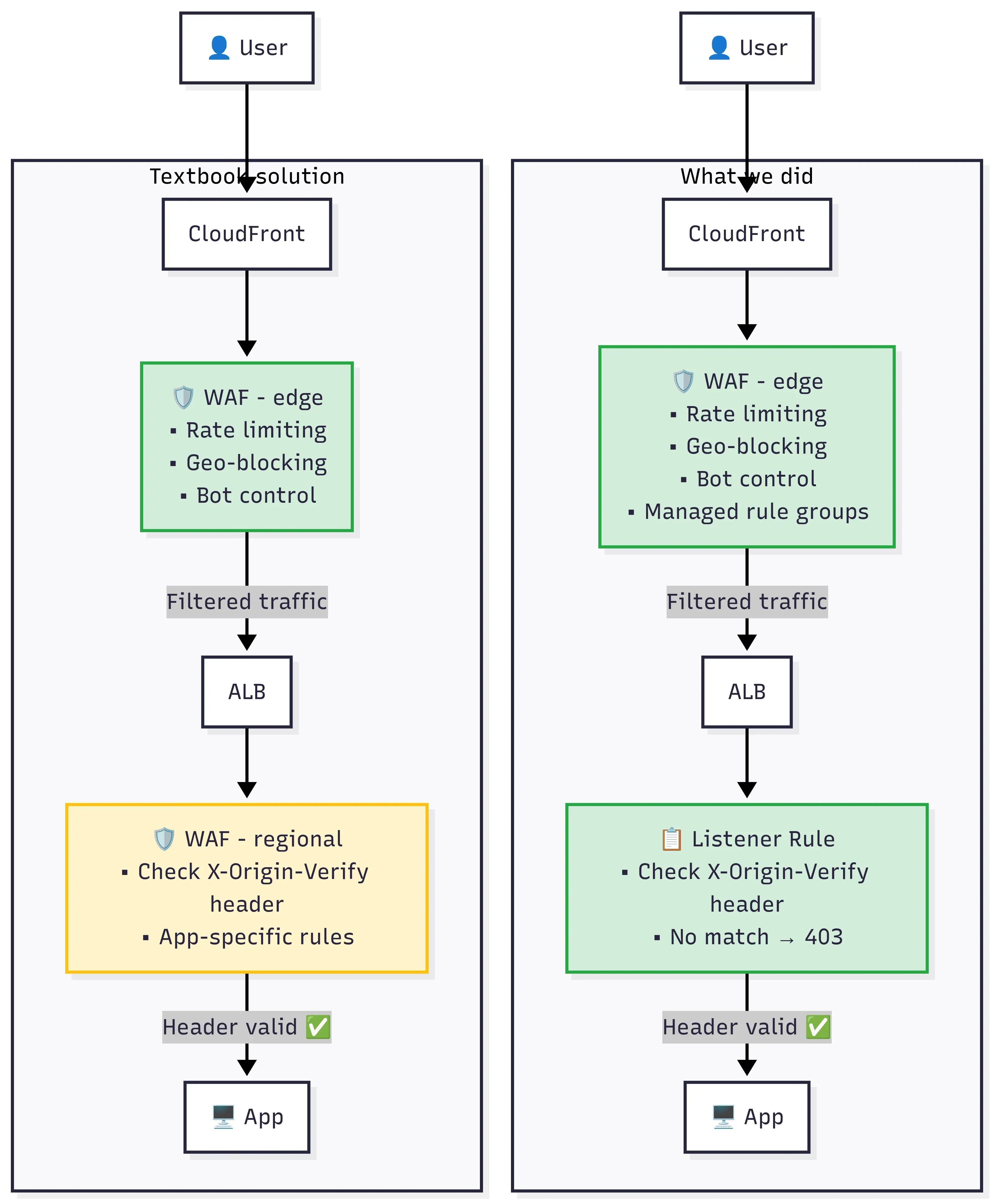
Figure 3: Decide where inspection happens
Health checks and things that break quietly
After we locked down the security group, the first thing that broke was our endpoint monitoring. We had an external uptime checker (a third-party service) that was hitting the ALB URL directly (no idea why and who had set up that monitoring to point to ALB DNS endpoint). It started reporting the site as down because it could no longer reach the ALB. Took us about ten minutes of “is the site actually down?” before someone remembered the security group change. The fix was simple: point the uptime checker at the CloudFront URL instead. But it’s the kind of thing you don’t think about until it fails.
A few things that bit us (or almost did)
While we were rolling all of this out, we ran into smaller issues that are not worth their own sections but are worth mentioning so you don’t hit them cold.
The listener rule ordering one - okay this was embarrassing. ALB evaluates listener rules by priority number, lowest first. We added the header-check rule but gave it a higher priority number than the default forwarding rule. So requests without the header were hitting the default rule first and getting forwarded straight to the app. The deny rule never fired. Caught it in staging, not prod, thankfully. Give your deny rule the lowest priority number so it evaluates first.
TLS between CloudFront and the ALB tripped us up briefly too. If you set the origin protocol to HTTPS (which you should), CloudFront validates the ALB’s certificate. That means the ALB needs a real cert for the domain you’re using. ACM handles this, but if you’ve got something unusual going on with your TLS setup, test the connection before you assume it works.
Oh and one more thing, don’t assume your ALB’s DNS name is a secret. Certificate transparency logs are public, DNS enumeration is easy, and old wikis, Slack messages, Terraform output from two years ago, all of that leaks hostnames. The security group blocks connection attempts from non-CloudFront IPs, so knowing the hostname alone doesn’t get anyone in. But if “nobody knows the URL” is part of your security story, you should probably rethink that part.
Final thoughts
The whole thing started because someone was debugging a latency spike and noticed weird request IDs. That’s it. Not a security audit, not a penetration test. A latency investigation that accidentally uncovered a gap we’d had since day one. Probably not the only thing we missed.
If there’s one thing I would want you to take away - go look at your ALB’s security group right now. If it still says 0.0.0.0/0, just go change it, it takes five minutes. The secret header stuff and everything else that we talked about in this post is the “how far do you want to go” part to secure your infrastructure.
Till the next time, Happy learning :)