Why 8.8.8.8 Is Fast Everywhere: Anycast in Plain English

You don't have to work in the DevOps or networking fields for very long to hear someone say, "Why don't you use 8.8.8.8 as your DNS server?" It's stable, quick, and backed up by Google itself.
Just so you know, Cloudflare also offers 1.1.1.1 as a free public DNS, and 8.8.8.8 is run by Google. We’ll use 8.8.8.8 as our example in this post, but the Anycast and routing ideas apply to other providers as well.
And the developer within you would at least think about the terms “Stable and Fast — but how? 🤔
We will surely come back to this question: “Why/How are all these giant public DNS servers fast in terms of communication?” But before we get into that part, let’s go back to the era of Broadcast, Multicast, and Unicast methods of communication. You must have come across these terms at some point in the past, based on what I’m assuming.
And if I had to sum up all of the communication channels that are employed in the networking industry in one sentence, it would go something like this:
Broadcast
This type of communication method is called one to all, regardless of whether the other party is willing to listen. Learn more: broadcasting in computer networks.
Multicast
This consists of communication with one-to-many and targeted peers. Learn more: multicasting in computer networks.
Unicast
You must have probably guessed by now, this consists of one-to-one communication. Learn more: unicast vs broadcast vs multicast.
In addition to the three I mentioned in the one-line definition above, there is a fourth type of communication in the line. I briefly mentioned those three methods because I wanted to focus on the next method in the line, known as Anycast.
Anycast
This consists of communication from one to the nearest available system/peer. I’m aware that a one-sentence explanation won’t suffice here, so let’s get started. “Nearest” is the key idea — we’ll come back to it.
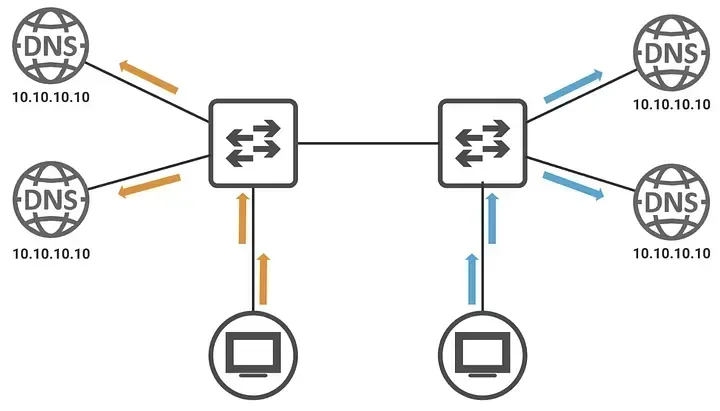
I want you to scroll back to the top of this blog and see that first image again, where you will see four DNS servers having the same IP address.
You must be thinking in your mind, “Hey, that’s not possible, we can’t assign the same IP to multiple systems at all,” and I totally agree with you here. But it’s very much possible on the Internet (only to receive traffic though) and that’s where the Anycast comes into the picture, multiple systems having the same IP and you happen to connect to the one which is nearest to you. (On a LAN, duplicate IPs cause chaos; we’re talking about the public Internet here.)
We’ll tie this back to why public DNS feels fast by the end. Now, let’s get back to the original question again, which was “Why/how are these public DNS servers reliable in terms of availability and quick in terms of communication?” Let’s try to understand this by drawing a couple of diagrams depicting public DNS services with and without Anycast in place.
DNS Server In One Location
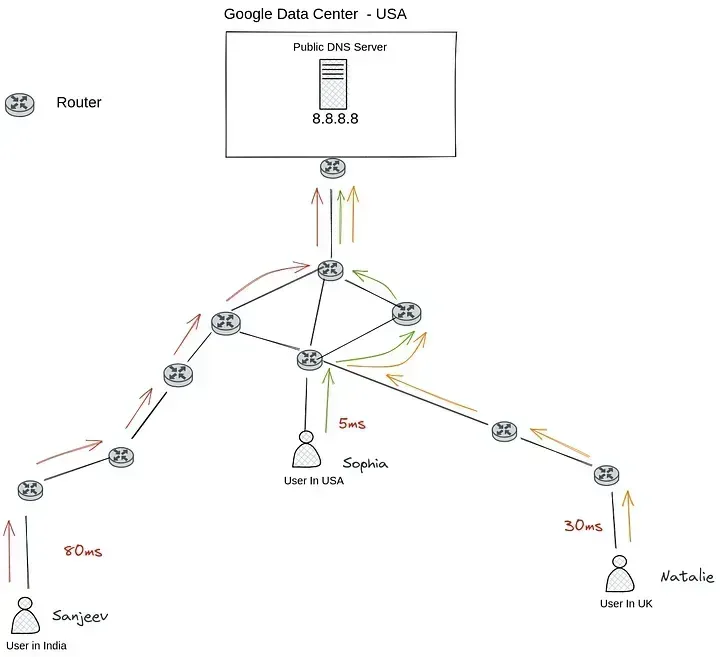
Figure 1 — Depicting Public DNS hosted in USA Datacenter
So here is the point, this diagram is depicting a public DNS server (service) being managed in the USA only
Latencies by countries according to Figure 1 would be
- 80ms for Indian users, a negative user experience
- 30ms for users in the UK, below average
- 5ms for users in the USA, pretty fast
Now there are two questions that we need to ask here
- Is this DNS stable for everyone ?? the answer would still be “No”, because what happens if that server (pool of servers) goes down or the network connectivity between the UK and the USA goes down, it would be working for users in the USA and India but not for the UK audience, right?
- Is this DNS fast for every user base here ?? the answer would be NO
DNS Servers with Multiple locations
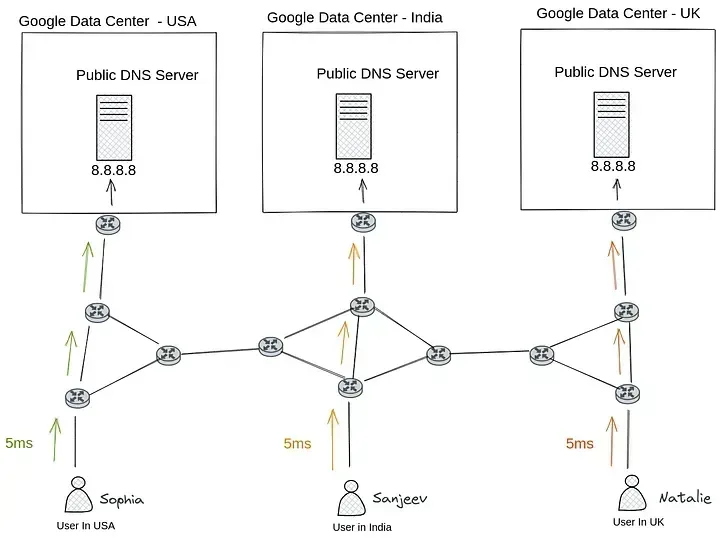
Figure 2 — Depicting anycast routing with Google DNS Server
In this diagram, a public DNS service with anycast is shown, where Google hosts its public DNS with the same IP in various countries and serves the local user base in each of those countries.
Latencies by countries according to Figure 2 would be
- 5ms for the UK, pretty fast
- 5ms for users in India, pretty fast
- 5ms for users in the USA, pretty fast
Now you need to ask those questions here again.
- Is this DNS stable for everyone ?? Yes, it is, because if a given server in India’s origin goes down, it doesn’t impact the user base from other countries, and also we can route traffic for Indian users to other nearest available servers (will talk about this below and how that works ).
- Is this DNS fast for every user here ?? Yes, it is, as every user is connecting to its nearest dns server with 5ms of latency
Okay, even though I drew those graphs but I can sense that the concept still seems to be unclear to everyone reading this blog here as to how on earth those servers deployed in different countries are configured with the same IP and most importantly how the end user always connects to the nearest DNS server.
Let’s briefly explain basic General routing principles, which, in my opinion, are quite relevant to this entire topic and, once understood, should undoubtedly clear things up.
Assuming you are familiar with BGP, it is also known as “The Routing Protocol of the Internet” and stands for Border Gateway Protocol. BGP is a protocol that is used by all international ISPs to route your packet along the best route feasible across the Internet.
Let’s use this diagram to complete our understanding of simple routing on the internet
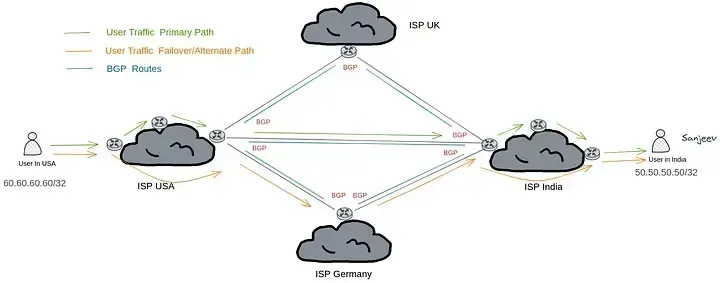
Figure 3 — Simple routing on the Internet
Looking at the diagram above, you will see that we have portrayed the full internet routing, with ISPs from various nations physically connected to one another and exchanging information via BGP.
Just to give you a general sense of what the diagram depicts. An IP address of 50.50.50.50/32 is given to a user called Sanjeev by his ISP in India, then afterward that ISP’s edge router sends a routing update to every associated ISP saying
“Hello, other routers. As of right now, you can send me traffic to 50.50.50.50/32 since I know how to get there.”
As further ISPs receive these routing updates, they begin to spread identical routing data to their peering ISPs, and so on. Finally, all ISPs must decide which of three possible routes to use to go to 50.50.50.50/32 and make that selection in order to select the best route.
Once all ISPs have access to the routing data, how will the communication between Sophia, a user from the USA, and Sanjeev, a user from India, proceed? When she sends a packet to Sanjeev, who in this case has the IP address 50.50.50.50, she first establishes a connection with its ISP provider. From there, it is the responsibility of her ISP to determine the best route to efficiently route that packet to its destination address using the best path (traffic in green color in Figure 3). If the best path to that route isn’t available for any reason — a wire cut, for example — traffic is then routed to the second-best path (traffic in orange color in Figure 3), and If neither the primary nor secondary options are available, the third-best option is selected.
This establishes one thing for sure: Whether the destination device is a single system or a collection of systems, an ISP will typically use numerous paths to get there in the actual world. (BGP picks the best path using AS-Path, hop counts, and other metrics — we won’t go into that algorithm here.)
I hope that makes it clear how basic Internet routing works. Next, our final diagrams will show how this ties to Anycast.
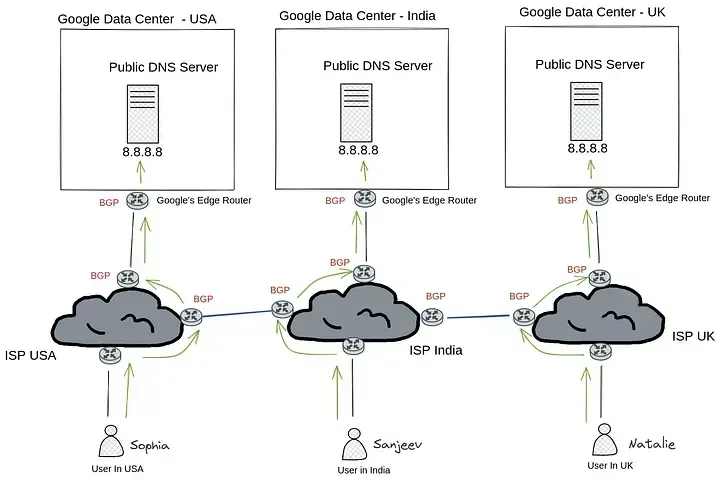
Figure 4. Depicting anycast routing with Google DNS Server
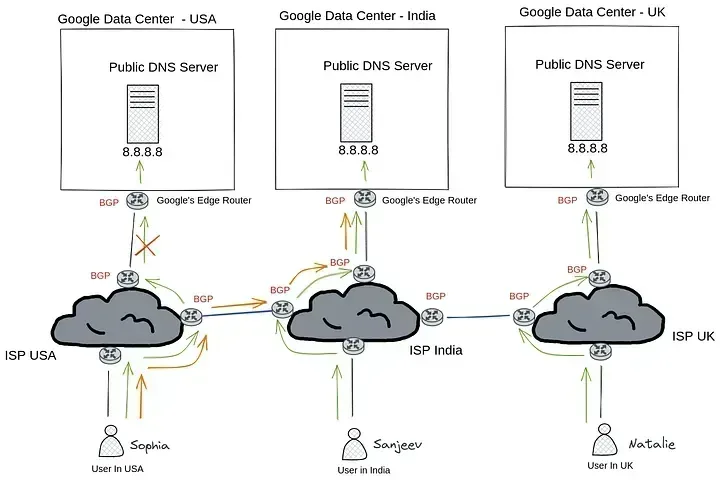
Figure 5. Depicting anycast routing with fail-over connection to another ISP
Figure 4 shows that Google has data centers all around the world. These data centers all serve the 8.8.8.8 public IP, and Google advertises the 8.8.8.8 route to all of the ISPs to which they are connected. All of these ISPs subsequently obtain the same route from other ISPs.
Currently, when user Sophia in the USA sends a DNS packet to 8.8.8.8, it first establishes a connection with her ISP, which then determines the nearest 8.8.8.8 server, which just so happens to be the google data center in the USA itself (because of the shortest path), and sends that packet to its destination.
Sanjeev, an Indian who uses 8.8.8.8 as his DNS server, does the same thing. He sends a packet to his ISP, which determines the location of the closest 8.8.8.8 server — which just so happens to be a Google data center somewhere in India (again because of the shortest path algorithm used by BGP)
this is how it works for users located in the UK as well.
And if you look at Figure 5, which resembles Figure 4 but is actually different, you will understand how important it is to obtain information about such redundant routes from other ISPs.
According to the diagram, a Google data center in the USA region appears to be having a problem and it stopped advertising 8.8.8.8 to ISPs. When an ISP in the USA learns of this, he quickly checks the other routes he has received from his peering ISPs and decides that requests from US users will now be routed via an Indian ISP to a Google data center in India that serves 8.8.8.8.
The ability to have multiple systems with the same IP address is practically legit as long as you own that IP as a business entity (like google does with 8.8.8.8) and they aren’t in communication with one another. Basically, this Anycast communication is made possible by the magic of routing between these ISPs.
NOTE — If you’re wondering whether hosting 8.8.8.8 by Google in various data centers was related to Anycast, No It’s not; Anycast is a broad routing notion that comes into play when servers with the same IP address are located in different places and the company like Google (which can operate as an ISP in and of itself) advertises its network to other accessible ISPs. Additionally, you are capable of doing it as well if you want.
Phewww !!!!! That’s a relief

Final Thoughts
Routing is what makes Anycast communication possible. Public DNS like 8.8.8.8 feels fast and stable because the same IP is announced from many places, and BGP sends your query to the nearest one. That’s the basic routing magic that runs the internet — and now you know how it powers Anycast.
Till the next time — Happy learning :)