IP Address vs MAC Address: Why Do We Need Both?

Your laptop has two addresses always, not one. It has a MAC address and it has an IP address too. Both of them sound like "the address of this machine," so it's normal to ask why you need two ?. There's a simple way to see they're not the same. Every device has its own MAC address, and those don't clash. But if two devices end up with the same IP address by mistake, the network gets confused and starts sending data to the wrong place. So the two are clearly doing different jobs.
A MAC address and an IP address answer two different questions. Every device has both, and everything you send over the network uses both at once. They are not two copies of the same thing. I learned that the slow way: an office once had two machines accidentally configured with the same IP, and for an afternoon a shared printer kept vanishing and reappearing while nobody could work out why. Two MACs, one IP, and the network couldn’t decide who was who. Once you know what each address is for, that kind of mess stops being a mystery.
What each address actually is
A MAC address is built into your network hardware, like your Wi-Fi card or your Ethernet port. It’s set at the factory, and it looks like a4:83:e7:1b:9c:2f. The first half of it is actually a vendor code, so you can often guess whether you’re looking at an Apple or a Cisco device just from the prefix. It belongs to that one piece of hardware and normally never changes. I say “permanent” loosely, by the way: you can spoof it in software in one line, it’s just that almost nobody bothers. Think of it as the device’s built-in ID.
An IP address is different. You get it from whatever network you join. At home, your router gives you one. At the office, you get another. At a coffee shop, a third. Move to a new network and your IP changes too. So an IP address doesn’t say who the device is. It says where it is on the network right now.
That difference, who versus where, is the thing to hold on to. Most of the confusion around addresses comes from mixing those two up.
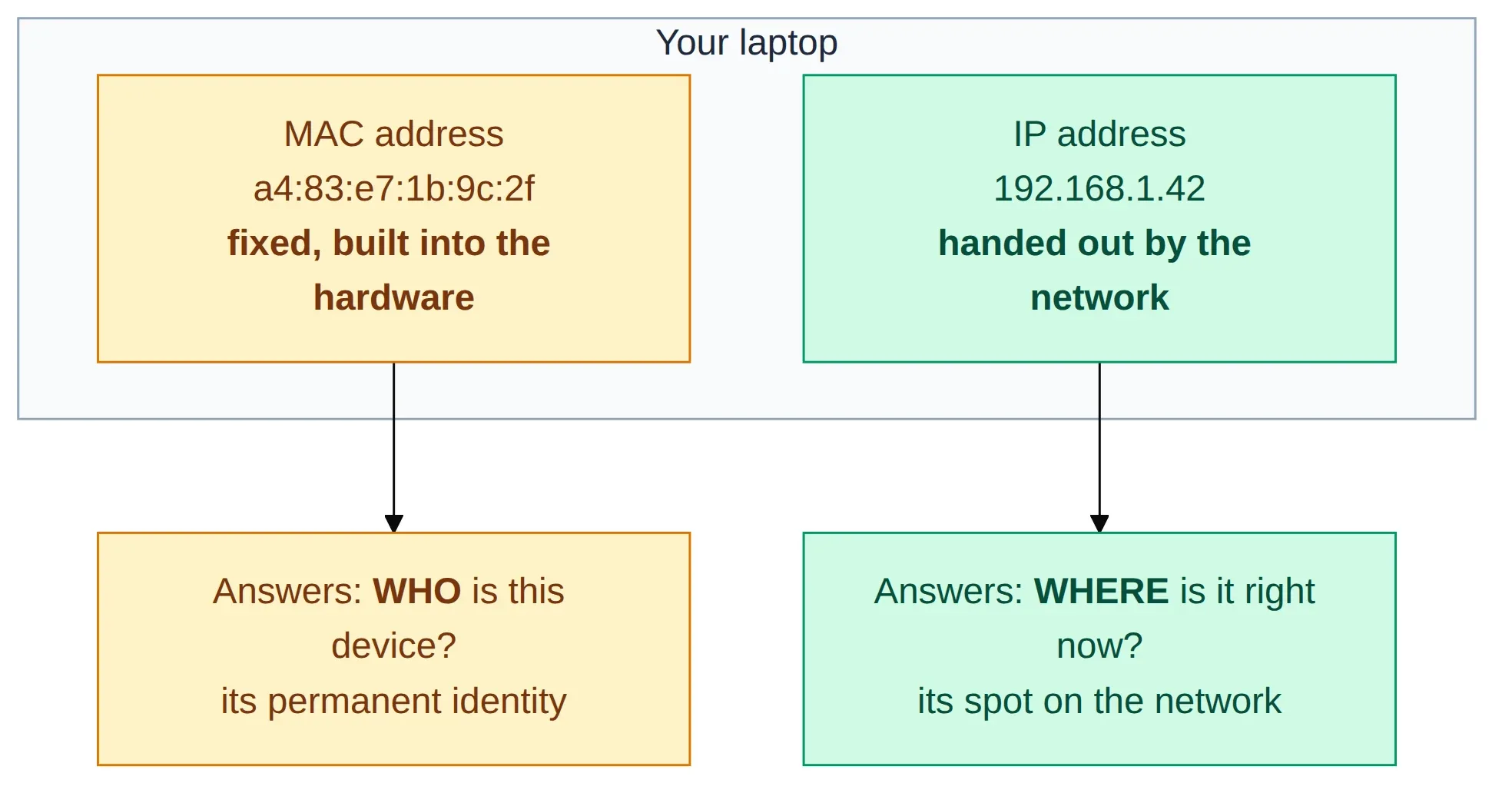
Figure 1: same device, two addresses. The MAC is its fixed identity (who), the IP is where it sits on the network right now (where).
Think of it like a name and a home address
Think of your MAC address as your name. It’s yours, and it doesn’t change when you move to a new house. But a name on its own is useless for posting a letter. “Send this to Sanjeev” means nothing to a postman in another country. Too many people have names, and a name doesn’t tell you where to go.
Your IP address is like your home address: country, city, street, house number. It’s written from big to small, and that order is what makes delivery possible. The post office looks at the country first, then the city, then the street, then your door. The address tells everyone which way to send the letter.
So why keep the name at all? Because once the letter reaches your street, the postman still needs to know which person it goes to. The address gets the letter to the right place. The name gets it to the right person.
Why two layers in the first place
This split is on purpose. Networks are built in layers, and the two addresses live on two different layers.
The MAC address works at the lower layer (network people call it Layer 2). This layer has one job: move data between two devices that sit right next to each other on the same local network. Your laptop and your router, say, or two computers plugged into the same switch. It knows nothing about “the internet”. It can only talk to things it can reach directly.
The IP address works at the layer above it (Layer 3). This layer’s job is to get data across many networks to a destination that could be anywhere in the world. It thinks in terms of routes and hops, not next-door neighbours.
Splitting the job like this is what lets the internet get so big. The upper layer never has to know about every device on Earth. It just has to get your data to the right network. Once it arrives there, the lower layer handles the last step: delivering it to the exact machine.
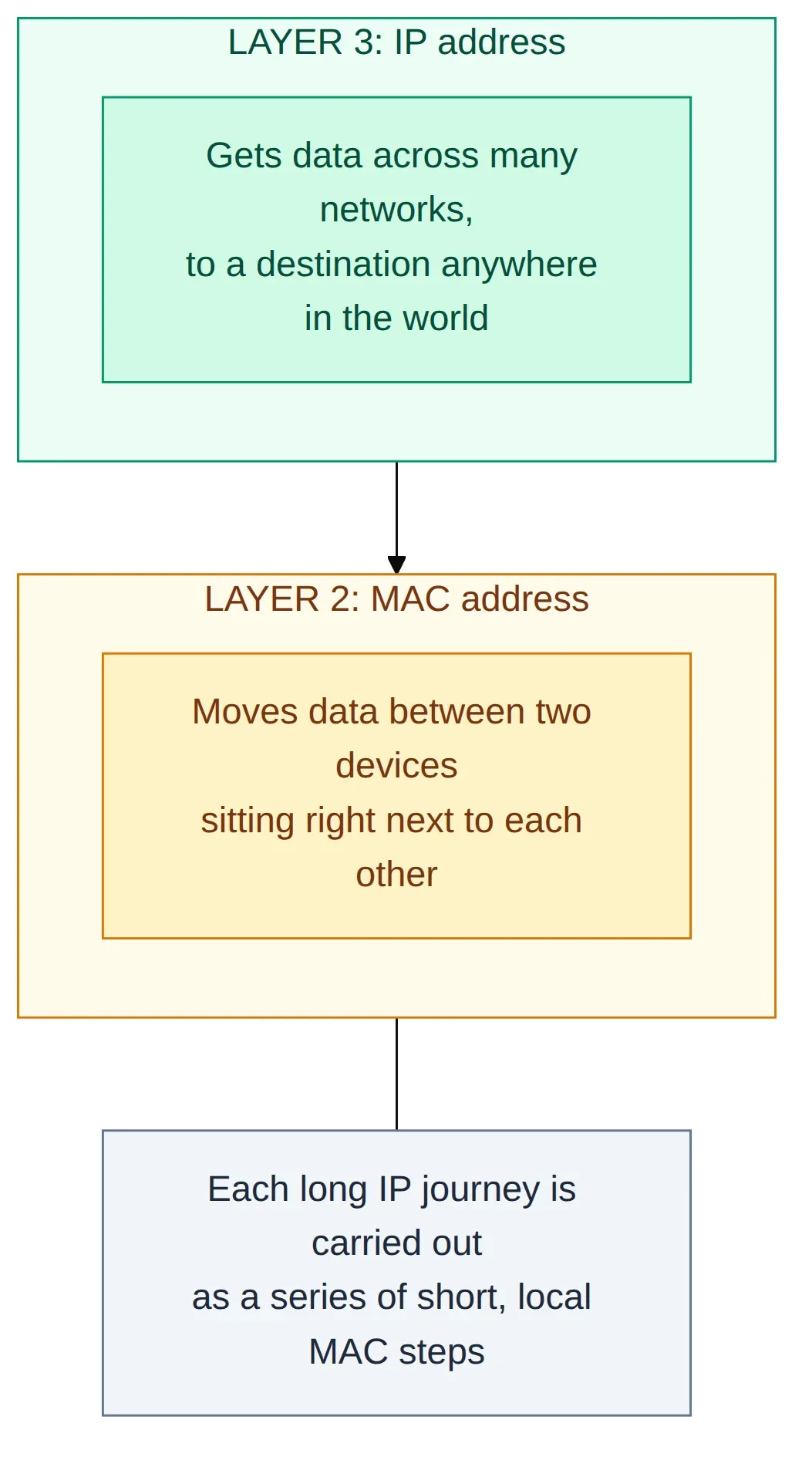
Figure 2: the MAC works on the local link (Layer 2); the IP works across networks (Layer 3).
ARP is the translator between them
There’s a gap here. Say your laptop wants to send something to your router. It knows the router’s IP address (192.168.1.1). But the lower layer can’t send anything until it also knows the router’s MAC address. So how does your laptop go from the IP it knows to the MAC it needs?
That’s the job of ARP (Address Resolution Protocol). Your device basically shouts a question to everyone on the local network:
“Who has
192.168.1.1? Tell me your MAC address.”
The device that owns that IP answers with its MAC address. Your laptop saves that answer for a while (you can see the saved list by running arp -a), so it doesn’t have to ask again every single time. Now that it has the MAC, it can actually send the data. Without ARP, the part that knows the IP and the part that needs the MAC would have no way to connect.
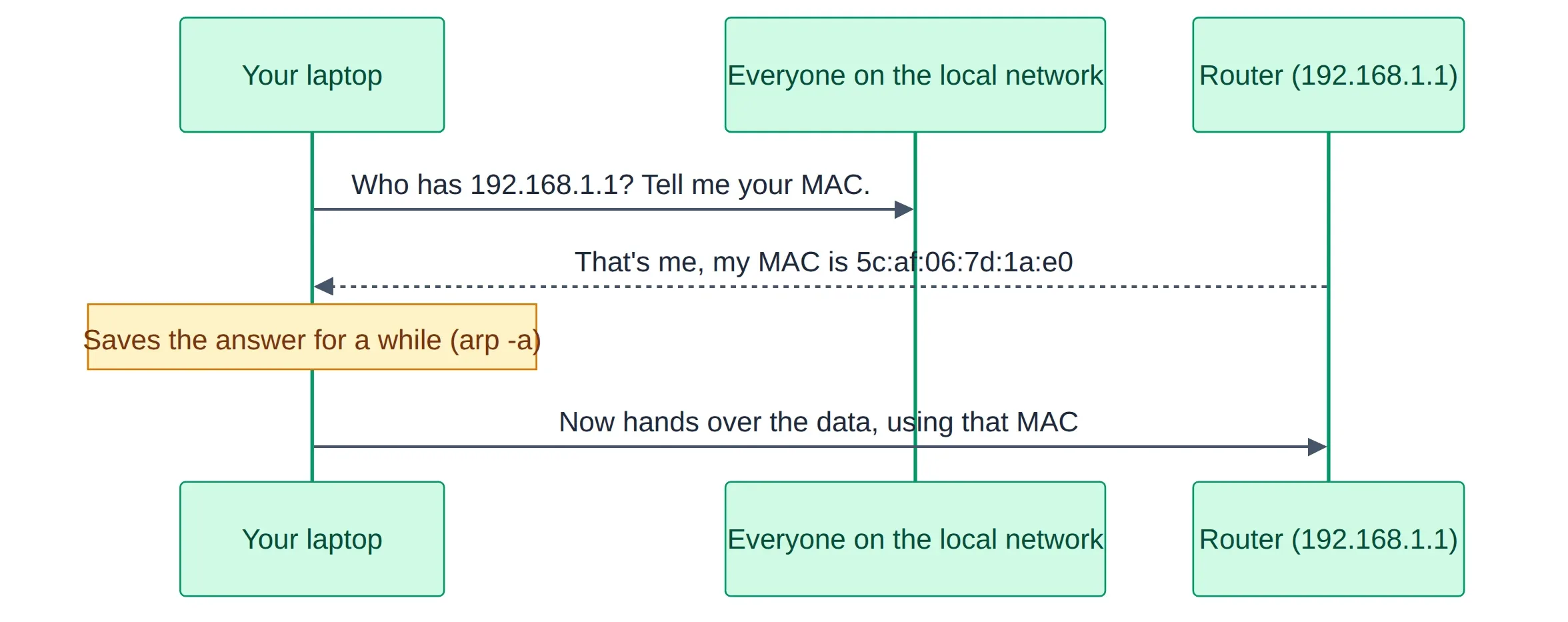
Figure 3: ARP turns an IP you know into the MAC you need. Ask the local network, the owner replies.
This is how IPv4 does it. IPv6 doesn’t use ARP. It uses something called Neighbor Discovery (NDP) instead. The job is exactly the same though: turn an IP you know into the MAC address you need for the next local step.
A real example: reaching google.com from your laptop
Before the technical version, picture sending a gift to a friend in another city. You write his full home address on the parcel and hand it to a courier. That address is the one thing that matters from start to finish. It’s where the gift has to end up, and it never changes along the way.
But the parcel doesn’t go straight to his door. The courier drops it at a local sorting center first. There it’s loaded into a bigger truck with hundreds of other parcels heading the same way, and a slip on that load says which center it’s bound for next. At the next hub the load is opened, your parcel comes back out, and it’s sorted into a different truck with a fresh slip for the hub after that. This repeats, center after center, first mile to middle miles to last mile. Each leg has its own short-lived slip that only means “get this to the next stop.” When it reaches your friend’s local center, the last slip says “out for delivery to his street,” and he opens the exact same gift you packed.
Networking works the same way. The home address is the IP: written once, true for the whole trip, never changed. The slip on each leg is the MAC: it only points to the next hub, and it gets peeled off and replaced at every center. The sorting hubs are the routers. And the gift inside, the part your friend actually cares about, is your data, which arrives exactly as it left.
Here is that same trip in real terms. Say you open google.com on your laptop. The server that answers might be in a datacenter far away, in another country like Germany. Watch where each address shows up.
Your laptop first needs google’s IP address. Once it has that (say 142.250.183.14), it still can’t reach that far-off server directly. The only machine your laptop can actually talk to is your home router, a few metres away on the same Wi-Fi. So the first step is a local one.
Your laptop puts two kinds of address on the request:
- IP: from your laptop, to
142.250.183.14(google). This is the full journey, end to end. - MAC: from your laptop, to your router. This is only the first hop.
To get the router’s MAC address, your laptop uses ARP, exactly like before. Now it can hand the data to the router, and the request starts its trip across the internet.
From here it’s a relay. Your router passes it to your ISP, which passes it to a bigger network, and on it goes, hop by hop, until it reaches google’s network. At every single hop, one thing stays the same and one thing changes:
- The IP addresses never change. It’s still “from your laptop, to google” the whole way. That’s how each router along the path knows where the data is ultimately going.
- The MAC addresses are rewritten at every hop. Each router swaps in “from me, to the next router.” A MAC only ever describes one local step, never the whole trip.

Figure 4: one long IP trip made of many short MAC hops. The IP is the same end to end; the MAC is rewritten at every hop.
When the data finally reaches google’s network, the last router there uses MAC one more time to hand it to the exact server. Then the reply makes the same kind of journey back to you.
Notice how uneven that is. The IP gets written once and survives the entire trip. The MAC gets thrown away and rewritten at every hop, maybe a dozen times. It does the hard work the whole way and gets no credit for it.
And this google trip is just an example. The exact same journey happens any time one device talks to another anywhere in the world, whether it’s your phone reaching a bank’s server or two servers in different datacenters talking to each other. Only the names and numbers change. Take this one trip as the template; swap in any two devices on Earth and the story barely shifts.
One honest exception: at a few borders, a hub relabels the destination address itself, a bit like a parcel-forwarding service that puts its own address on the box and forwards your gift onward. In networking that relabeling is called NAT, and it’s a topic of its own. For a single leg along the path, the rule above still holds, and it’s the right way to picture it at first.
Could we get away with just one?
So why not keep it simple and use just one of them? Only MAC addresses, or only IP addresses?
Only MAC addresses? That breaks once the network gets big. MAC addresses have no order to them. There’s no way to say “this whole group of addresses lives over there.” That’s fine on one small local network. But to reach across the whole internet, every router on Earth would have to know exactly where each of the billions of devices is, one by one. Picture a phone book that lists every phone on the planet and gets reprinted the moment anyone buys a new one. That’s the list you’d need, and nobody can keep it. IP addresses are grouped in order, so a router can make a quick decision (“that group is that way”) without knowing every single device.
Only IP addresses? That fails at the last step. IP addresses are handed out by the network and can change. And on a shared connection like your home Wi-Fi, the hardware still needs a fixed ID to know which device a piece of data is actually for. That’s the MAC’s job. It’s the address that moves data between two devices sitting right next to each other.
So they aren’t doing the same job twice. One is made for finding a path across many networks. The other is made for handing data to one exact device. Force either one to do both jobs and it falls apart.
The same machine can sit behind more than one IP
Even the IP side has a twist. Ask your laptop for its IP address and it might say 192.168.1.42. Open a “what’s my IP” page in your browser and you’ll see something totally different, like 103.21.244.7. Same laptop, same moment, two different IPs. Both are correct.
The 192.168... one is a private address. It only means something inside your own network. A few ranges are set aside for this (10.x, 172.16.x to 172.31.x, and 192.168.x), and millions of homes and offices reuse the exact same private addresses. That’s fine, because these never appear on the open internet. When your data leaves for the wider world, your router swaps your private address for its one public address, then swaps it back on the way in. That swap is called NAT. It exists because there were never enough IPv4 addresses to give every device its own public one.
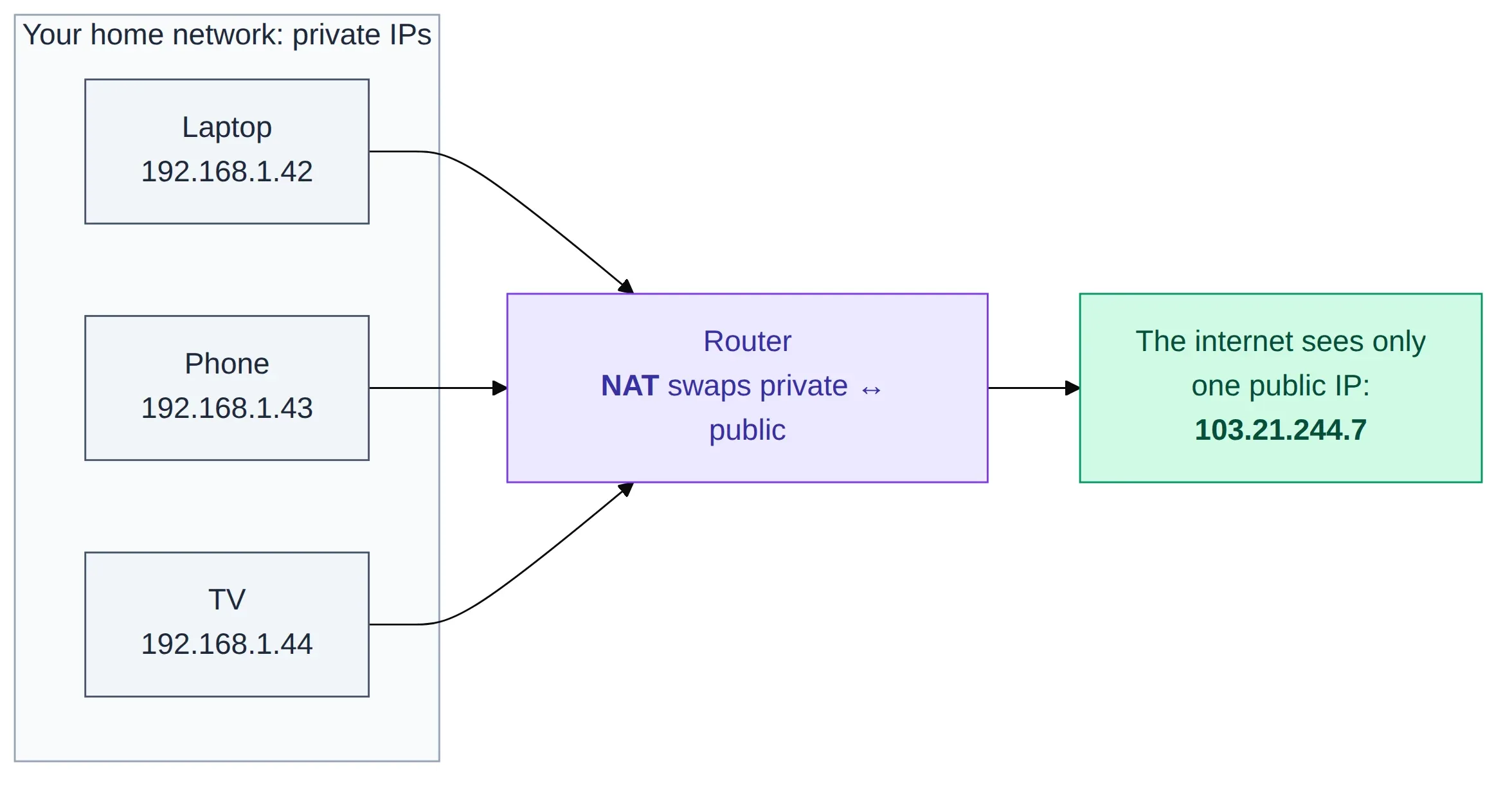
Figure 5: many private IPs inside your network share one public IP to the outside world. That swap is NAT.
So even “the IP of this machine” depends on who’s asking. Inside your network it’s one number. To the outside world it’s another. (IPv6 is the long-term fix for running out of addresses. It has so many addresses that every device can have its own again, with no need to hide behind NAT.)
Two addresses reach the machine, a port picks the program
There’s still one more gap, even after the data reaches the right machine. Your laptop is running lots of things at once: a few browser tabs, maybe a file downloading, some app updating in the background. The IP got the data to the laptop. But which of those programs is it for?
That’s what a port is for. It’s a number that points to one specific program on the machine. A website is usually on port 443, for example. Each browser tab you open gets its own port number too. Back to the address picture: if the IP is the building, the port is which door to knock on once you’re inside.
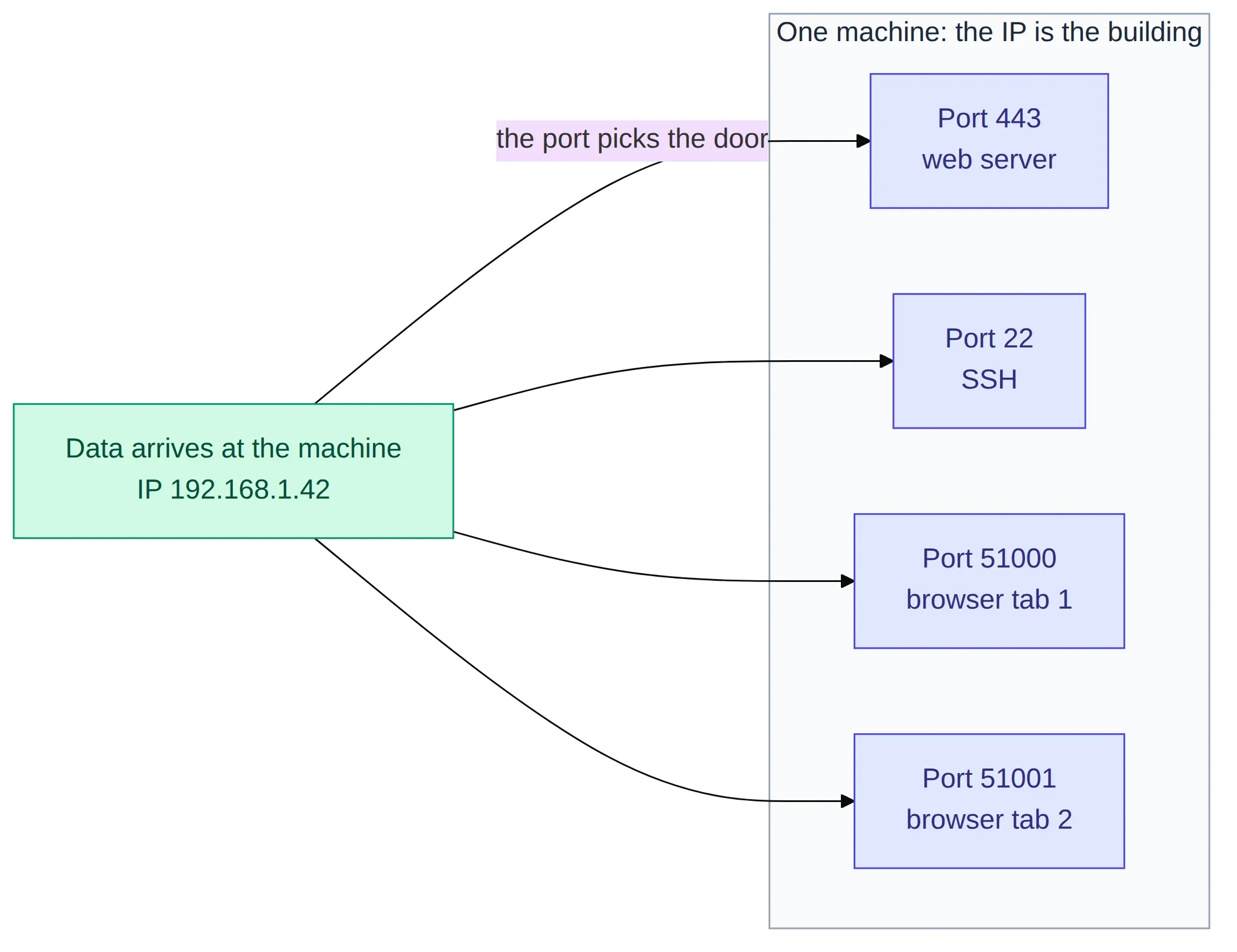
Figure 6: the IP gets data to the machine; the port picks which program inside it.
This is also how your machine keeps many connections to the same server straight at once. Each one uses a different port number, so their data never gets mixed up. (An IP and a port together is called a socket, a word you’ve probably seen in logs.) Ports work one layer up from IP. So that’s already three different addresses doing three different jobs, and we still haven’t reached the one people actually type.
The address you actually type
Nobody opens a browser and types 142.250.183.14. You type google.com. That name is an address too, just the friendly one made for people. The network still runs on numbers, so the name has to be turned into an IP first. Turning names into numbers is the job of DNS.
People can remember google.com. Nobody remembers the IP behind it, and honestly nobody should have to. The website can swap that IP whenever it likes, move to a new server, a new country, and you’d never notice. The name stays put while the number underneath it changes.
Final thoughts
The honest answer to “why do we need more than one address” is that no single address can answer every question. The MAC says which device, on this one local network. The IP says which machine on the wider network, and roughly where. The port says which program on that machine. The name (like google.com) is the part people can actually remember. A normal request quietly leans on several of them at the same time without ever telling you.
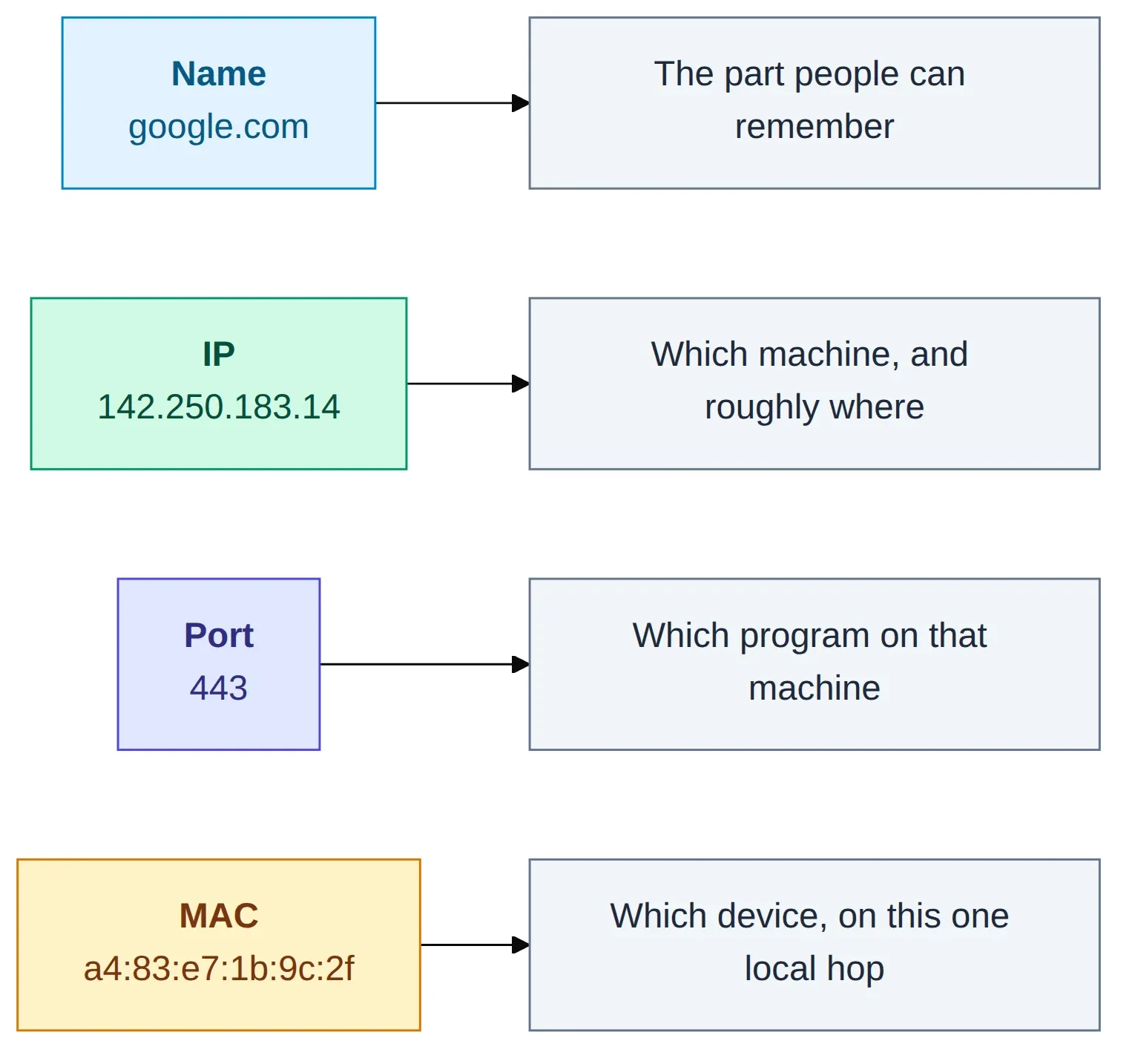
Figure 7: four addresses, four questions. Name, IP, port and MAC each answer something the others can't.
If you keep one line from all this, keep this one: the IP gets your data across the internet, the MAC gets it across the room. The IP stays the same for the whole trip; the MAC changes at every step; ARP is the little helper that lets one find the other. Ports and names ride along on top.
Run ip addr sometime and look at the IP and the MAC sitting side by side. They’re not the same thing written twice. They’re two of the quiet teammates that every request you make depends on.
Till the next time — Happy learning :)